





NOTE: This page was first published in 2010. Be sure to read the community’s comments below for additional ideas and more recent methods.
I’m the type of person who likes to create systems for doing things, whether it be business procedures or a household-related task like a reusable shopping list template.
So I thought I’d share how I organize my tangles and the steps for drawing them in case it’s helpful for fellow Zentangle® Zealots.
To start with, I use Moleskine® squared notebooks. The paper is acid-free and nice and smooth for drawing with the Sakura Micron Pens. The squared pages provide light guidelines and these help me get more accurate proportions when I draw. Not having done any drawing before, I need all the help I can get. These notebooks are a perfect size for portability along with your Zentangle® supplies.
In the small notebook (3 1/2 ” x 5 1/2) I begin by marking up the page with light pencil dots in 3 cm squares (6 boxes in each direction). This is actually quite a relaxing process in itself and can be done while “watching” television. Here’s what the page looks like when the pencil dots are done:
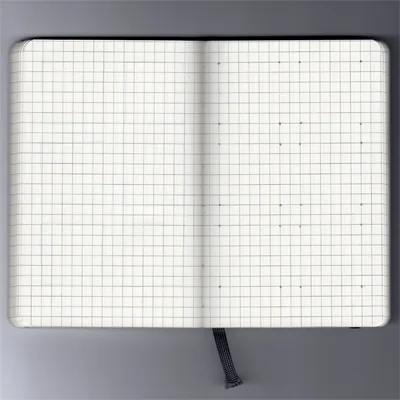
Lightly penciled dots create 6 boxes for the step-by-step illustrations
I do several pages at a time and then connect the dots to create the boxes. I even treat this like doing a Zentangle®, making all the lines in one direction first, then turning the notebook and doing the lines in the next direction, and so on. This process conveniently gives you 6 squares for your step-by-step instructions. Some tangles need an odd number of guidelines, so for those I do a page of 7-box squares. Here’s an example of the boxes ready to go:
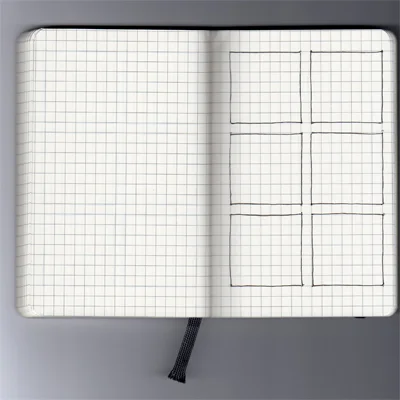
I’ve only use one side of each page because some tangles are quite dense with ink and there can be a little bleed-through through on the back of the page.
I leave the first couple of pages blank in the book and number the top right corner of each page. Then I can write in a Table of Contents on the blank front pages. This reference helps me find tangles quickly.
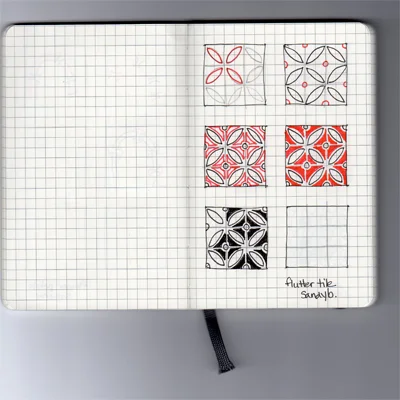
Then I draw the step-by-steps with red and black Sakura Micron pens. I often use my Zentangle pencil first to get an idea of how to place strokes correctly, then I throw all caution to the wind and let it rip with the pens. Here’s an example of Sandy Bartholomew’s tangle, Flutter Tile.
Recently I purchased the larger 5 x 8 1/4-inch size squared Moleskine®. In this one I’m creating a library of finished tangle samples and examples of variations so I can refer to it for inspiration. This size fits 15 tangles per page, so there should be lots of room for growth. Originally I used a small Moleskine® for this purpose, but it didn’t take long to fill it in. Here’s an example of what the small page looks like.
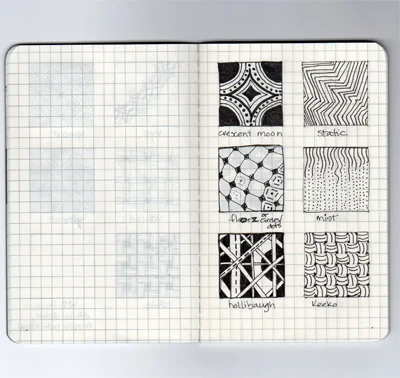
The first book of my tangle library, now replaced with the larger size Moleskine® with room for 15 tangles per page.
I invite you to share your system of organization for your tangles in the comments. Systems can always be improved and I’d love to hear what you guys have sorted out. Over to you …
BTW – Be sure to visit the DOWNLOADS tab at the top of the page for free downloadable templates to use for your tangles.
Get Your Supplies Here at Excellent Prices
If you’d like to try out my system, you can get these supplies on Amazon and they have great pricing compared to local retail outlets:
- This is the 3 1/2 x 5 1/2″ smaller Moleskine notebook that I use for the step-by-step drawings: Moleskine Classic Notebook, Pocket, Squared, Black, Hard Cover (3.5 x 5.5″)
- This is the 5 x 8 1/4″ large notebook I use for my “library” of patterns. I use the small notebook for the step-by-step drawings: Moleskine Classic Notebook, Large, Squared, Black, Hard Cover (5 x 8.25″)
- This is the red version of the 5 x 8 1/4″ large notebook I use for my “library” of patterns. I use the small Moleskine for the step-by-steps: Moleskine Squared Red Notebook Large, Red (5 x 8.25″)
- The BLACK Sakura Micron 01 pen for Zentangles: Sakura 50035 6-Piece Pigma Micron-01 Ink Pen Set, 0.25mm, Black
I’m a fairly new tangler and have started some pages of tangle ideas that are organized by types. You look at a blank spot on your drawing and think “that space needs something on a grid” or “something with circles would look good there”. Of course the hard part is classifying the tangles in my Idea Notebook.
I thought about using a bound book, but use a homemade version so I can take out just the ones I need for a particular piece and use a heavier weight paper. Here’s how:
1. Design page in Word. Each page holds 3 finished cards, each card has room for identification, small boxes for steps, a larger area for the finished pattern, and a section for notes.
2. Print the pages. Cut into 3 cards, punch holes.
3. Draw in the tangles. Add shading, any options, and any notes or ideas as you complete each card.
4. Lace the cards together with book rings, ribbon, or string. I use a Red shoelace.
I like to sort the patterns, for example, pull together the “organic” or “geometric” patterns, or sort by density. It helps me select what pattern to use. Does any one else sort like this?
Wow, that’s a LOT more organized than my “system”.
Whenever I find a pattern or step by step card I want to try, I copy/paste it into a word doc. I arrange them to get as many as I can on as few pages as possible, then print.
Those loose sheets of paper are filed (read stuffed) between the two tangle pattern books I won from Suzanne McNeil in my basket of tangling stuff.
I tried to copy the patterns & steps all into one notebook, but it wasn’t gridded just lined, so they went sideways on me. Plus, I couldn’t make myself stop at step 1, then step 2. Or I’d get step 1 & 2, but screw up 3 & 4, and have a wasted page. I guess I’m dense, but the idea of starting with a pencil first never occurred to me d’oh.
There’s no sorting or anything, I just kind of flip through until I see something I want to use.
This is a great idea. For myself, I keep my patterns on 8-1/2 x 11 card stock in a binder. I also scan the pages and copy them into a photo album on my iPod Touch so I can refer to them any time.
The iTouch idea is brilliant. While I adore the idea of the small moleskine journals – using the iTouch, or similar, means less stuff to haul around when traveling. The Archos 5 offers 256G of space so you can load, music, audio, videos and a ton of picture files into a device the only slightly bigger than an index card. Thank you for this.
Love, love, love the idea of keeping them on the iPod touch – going to have to do that myself – I get so frustrated when I don’t have my notebook handy. Thanks!!!
While I do that too, there are times when I do not have access to the internet and a hardcopy of how to do it is great.
I use the Circa system in Junior size. You can add, subtract, move pages with no problem.
What is the Circa system?
Try doing a Google search Lesley, there’s lots of info there about Levenger’s system.
I printed instructions off and keep them in a loose leaf binder. Would be ideal to alphabetize them too. I love the photo album for iPod idea too.
Love to Use Ur idea!!
I’ve started putting mine on 4×6 unruled index cards. I have a template I created with 6 blank boxes. I printed a bunch of them out and I use them to create new tangles I make up or learn. I then store them in a photo album (small, but lots of pages). I can also print things I find online onto the 4×6. This way I can rearrange (if I ever got that organized.. not) them into a different order any time I need to. I have scanned them so I can print them for class handouts when I teach. It’s a handy size for most people to deal with. But then again, there is always a better system somewhere 🙂 I guess I’ll see how long this one works.
I have a 3 ring binder. I have been printing pattern insturctions and putting them in page protectors.
The binder has pockets in it and I have my copy of Totally Tangled in one of them and Zentangles 1 and 2 in another.
The cover of the binder has a place for a sheet of paper. I took a piece of cardstock and used my printer to print the word Zentangle very large and arched in the center of the page and I’ve been doing tangles on the remainder of the page.
I have a pencil box that I have pens (Micron and Copic) and pencils (both hard and soft). So I can grab the box, my binder and a spiral book I have and I can tangle to my heart’s content.
I’ve experimented with several different methods – each of them had parts that worked but overall I’m still looking for a better way – so I’m very interested in hearing what others are doing.
Had a Duh moment re: Genevieve’s post and iPod Touch. I copy/paste the images of instructions and also use software called SnagIt to take screen captures of tangle patterns I see in others photos. All saved as photos. I often wondered about having them handy on my Touch but never connected the dots of loading up all my screen captures. That will be this weekend’s project! Thanks for that idea!
My first attempt – copying all the images into Word Tables and keeping them in a 3 ring binder. As the collection grew it became too unwieldy.
Next up was Sandy Bartholomew’s ATC Tangle cards. Using the red and black 005 pens I recreated all of the instructions I’d gathered. I now find the cards too small but I learned a lot. By recreating the instructions in such a small space I was more accurate and built my confidence as I didn’t think I could draw. Drawing a very short line, straight or curved, was a lot easier than drawing a long one! Recreating the patterns on the cards also was a big help in learning the patterns. Still using a 3 ring binder I stored the cards alphabetically in 9 sleeve baseball trading card sheets.
I’m currently experimenting with creating my own 4×6 cards – again drawing each patterns instructions. I want to go that route again to reinforce the muscle memory of drawing the patterns and I want a resource book not only for myself but for students as I also want to teach.
I do better when I organize them alphabetically – I seem to remember the actual name better than how I would classify it – I’m horrible with tags and such. Whatever I end up with it needs to be flexible enough to insert new designs anywhere in the list.
And of course I visit tanglepatterns on a regular basis. Because it’s organized so well I use it to fill in the blanks of my disorganization!
I am pretty anal about organization and am beta testing a couple of ways of doing it. I have the small moleskin you have and I also have a binder. I have been printing off the web and throwing into the binder. The nice thing about that is that I have it tabbed alphabetically and can add to it easily. The bad thing about it is that there is no uniformity of uploading so some patterns can be printed out nice and large and some can’t. I never thought of doing the patterns myself (ie. the step by step part) and this makes total sense to me. On top of everything else, repeating the steps in order to get the finished pattern will help “groove” the steps in my mind. The only bad thing is that there is no order to it–you just do them as you do them.
I am beginning to think that a dual system is required. The small moleskin for portablility and quick reference and a binder organized by alphabet. If I bought graph paper and did the patterns myself echoing the moleskin procedure, I would have the binder more uniform. (So far, though, I am like Jill in that I am not very good at doing the patterns! I race way ahead of myself etc.)
About to head out on vacation, trying out these ideas seems like a pleasant way to spend some time!
Excellent ideas here. Namaste!
@Karen – organizing by types is a very good idea too. I thought about making a list of patterns by type (a speadshseet with columns) to refer to but haven’t done anything about that yet.
@JillE – I like your ideas for categorizing, density wouldn’t have occurred to me but I can see it’s a very useful category.
@Jill – you might like to try squared paper, I find it really helpful and I’m able to judge proportions better when I hit the blank tile.
@Genevieve – thanks for sharing your great idea for the iPod Touch!
@Deb – there’s virtue in not organizing too because you come across patterns randomly, and I suspect you’ll use more rather than repeating favorites. My DNA isn’t coded that way though, I HAVE to organize.
@Carole – the 4 x 6 card idea is a good one too. As a teacher, I’m sure you have to make your system work for dual purposes. You’ve given me another idea, I’m going to add a DOWNLOADS page to the site and post free PDF templates for squared pages and index cards. (Oh swell, another way to push Zentangling further down my list!)
@Alyce – you have a handy Zentangles-To-Go kit there. Cool cover too! Portability is a super feature of this art form because you really can take it just about anywhere.
@Suzanne – totally agree with you about drawing the step-by-steps, the “muscle memory” you refer to is so important for me to recall how to draw the pattern. And SO pleased you find the site valuable! Thanks.
@Kim – I think you’d really enjoy drawing out the step-by-steps. There’s not only the muscle memory Suzanne refers to, but for me it’s SO exciting when I get that Ah-Hah moment part the way through where I really “get” the pattern.
Keep the great ideas coming!
Reading through the comments, categorizing patterns (beyond alphabetizing by pattern name) is a common thread.
Over my morning coffee it occurs to me that one way to use an alphabetized system (whether in binders or on cards) would be to color code the edge or a corner. I’m thinking with a marker because color “dots” would very quickly make the pages “thick”.
As a simple example you could use a green marker edge/corner for organic patterns.
This needs thinking through because once you’ve marked the cards it’s a permanent solution!
See any glitches to this idea?
I like the idea of colour coding within alphabetized categories. I am thinking of the little skinny post its you get that are transparent except for bright colours on the ends because that would let me change my mind. Which I tend to do. A lot.
Regarding color coding: some tangles would qualify for several categories (grids, stripes, circles, ziggy, loopy, squares, triangles, *agons,eg would be some of my categories). Col-erase erasable colored pencils would be excellent for coding, permitting changes of mind.
Regarding index cards (commercial or custom): Index card containers abound these days,and would allow all kinds of shuffling and layout experiments without having to remove rings or other binding devices. I’ve seen the gridded index cards in several sizes; seems to me they’d be ideal.
When I first started out I did try to assign some type of category so I could file them but as I looked at the patterns I could never settle on just one category. Trying to assign multiple categories it got more complicated. As that started to feel too much like work I retreated to the simplicity of alpha.
I have moved to larger cards so I can add more notes. When I see someone use a pattern in a creative way or a variation, I’ve started to jot a note and quick sketch on the original card.
Another plus for me of keeping it simple – many times I’ll have a pattern in mind that I want to use but need to review the steps – while leafing may way through my binder to the pattern I think I want to use, I’ll come across another pattern that ends up working out even better.
Seems like the biggest hurdles – for me- at least when working with hard copies is defining a set of categories that’s not too complex and then applying it consistently.
The beauty of tags online is the ability to search on them. Linda are you thinking about adding more tags that relate to type, style, use, complexity, and???? Would be interesting to know what terms folks use to describe their own categories – most likely to search on?
Excellent suggestions and advice, Suzanne. Keeping things simple is no doubt at the heart of Zentangles too.
And yes, I wrote when I first started the site in May it that as it developed I’d add tags related to types of patterns. Haven’t made time for that yet, but it would be very helpful for me if you all would let me know what tags you’d find useful.
Suzanne, you’ve prompted me to add a post related to tags for the site so I can keep the discussions “categorized” ;-).
So if any of you have more suggestions for pattern tags for this site, please head on over to the post: Tangle Pattern Tags.
I think I’ve about done it all! Currently, I save all the patterns to my PC and each month I copy them to a CD. I also make up 4×6 cards with steps and I print out pages of blank gridded boxes that I create in Word to draw out the finished patterns w/o steps. I print them in landscape format and fold the page in half. When I have 10 sheets I sew the pages into a signature, and will eventually bind all the signature into a book or two or three. This is my offline quick reference, or what I use when I want to take all my patterns somewhere.
I use the 4×6 cards for everyday reference. I take the newest tangles so I can try them out, and then grab 5 or 10 other cards at random, so I’ll have a pool of tangles to choose from. Most of my zens consist of a 1-2 randomly chosen patterns, 1-2 I’m learning, and 1-2 that I’m trying to design.
I organize-kind of. I love making lists and compiling things, but I like to change how I list or compile, so in essence I set things up for flexibility. When I print out a 4×6 I make sure that both sides have patterns by the same artist, or leave one side blank. I keep the cards stored by artist. This helps me if I can’t remember who did a pattern. Meanwhile, if I decide I want to organize a certain way, say, just patterns that are 3D, instead of choosing at random I grab the patterns I want, re-sort by type, and carry them with me as long as I need them that way.
Backing up your patterns to CD is a very good idea, Sandra. Right now mine are all backed up together with everything else — I like the idea of keeping the patterns separate.
It seems the 4 x 6 card format system is very popular here (and given the number of times the templates I posted have been downloaded already) plus they are portable as you suggest for taking a select few with you.
As much as I like flexible systems, all those loose cards would probably drive me a little nuts though.
I store the majority of the cards in a shoe box, with large paper clips to hold them in groups, and I have one of my origami tyvek wallets that holds 4×6 for the ones I carry around. I’ve also thought about punching a hole in the corner and putting the cards on a ring. Not sure that would work as well for me though.
I just wanted to let you know how much i admire your work, of all tangle sites i find your work so inspiring, and encouraged me to use color by using pro markers.
keep up the good work, its amazing!
Ohhhh, thanks! I see how I can combine some ideas and improve my system, without re-doing it!
My cards are 3.25″ x 8.5″
After I’ve drawn in the steps, pattern, notes, and ideas, I can scan them into Photoshop and use the File Information field to add tags to help me sort very quickly. PS also has previews. And I can tag any reference photos or screen captures, too. And my finished pieces, too!
Do you guys do this, too? I take my camera everywhere and snap ideas for patterns. I also do a screen capture of images I see online that inspire me in some way, such as composition, color, movement, look-and-feel, etc.
My collection is growing exponentially, so this system will only get more valuable as the collection grows. I agree, I need both a physical system and an e-system. I thought I could bypass my own e-system by using this website – thank you , Linda! – but I see where creating my own e-system will be a huge benefit.
That’s an unusual physical size, Jill. What made you decide on that format? The 3.5″ width is the width/height of a Zentangle tile, does that have anything to do with your choice?
Great idea to use Photoshop for tagging the files because as you point out, the collection does grow exponentially.
I’ve been experimenting with incorporating some of the suggestions offered here. Especially with adding patterns to my iTouch.
As a result I’m thinking of adding another tool to assist in organizing. Wondering if anyone is using one of the Bamboo Pens by Wacom and how well it might work for sketching and creating pattern steps?
http://www.wacom.com/bamboo/bamboo_pen.php
It appeals to me on many levels both for personal organization and zentangle related business ventures. I’m not sure I can articulate it all here without turning it into a small book. On the other hand I’m a gadget lover and have wanted one for a long time. This may be just the excuse I need. LOL
Loving all the discussion and ideas here.
You can go for the Bamboo Pen, I’ll go for the iTouch!
I’m wondering though, don’t you think you’d miss the pen and paper experience? And the break from technology.
I have a Bamboo tablet that I use for digital art. I’ll have to give it a try for Zentangle.
My scheme isn’t as organized as others but it works great for inspiration. I use a photo editing program (Paint.net is a free one for PCs and I use Graphic Converter for my Mac) and have a template set up that is just under 4″ x 6″. I re-size any photos I have of the tangle instructions so I can get at least two tangle instructions on each 4×6 page. Then I upload them to Snapfish and have them printed at $.09 per photo. I usually wait until they are having some special (about once a month) and order them in bulk.
I have no organization when it comes to names, etc. they are put on the template totally at random depending on which way they face (horizontal or vertical) and how they fit! I told you not organized in that respect…
I was having trouble figuring out how to easy store the photos to access them when I was working on a tangle and I found a great solution at my local Big Lots – photo albums that hold 72 photos (for $2.00) each. I bought 6 of them! They had a smaller size as well so I got those too and am putting my photos of samplers in those.
I store all my Zentangle stuff in a plastic scrapbook carryall with my pens and pencil and eraser in a rigid pencil case, a clipboard for drawing anywhere (although I could use the top of the case as well) and my inspiration photo albums. So I have everything in one place and it’s easy to pick up and carry anywhere.
Susan, what a great idea to use the 4×6 size, since that’s the standard photo printing size, you can get them printed inexpensively, and there are a lot of storage choices!
So after reading this last week, I dug out the gridded notebook I had a work.
Over the weekend I transitioned all the step-by-step patterns from zen folks I’d collected, as well as the pattern pieces (henna designs are a great source btw) from around the internet, into it.
Just a few more to go but I have a very nice reference book now.
Thanks for the kick in the a.. I mean, inspiration.
Sometimes all we need is a little shove. Sounds like you had a fun weekend! We watched the World Cup matches and Tour de France stages – didn’t have much time to draw.
@Linda: The size came from my materials. I have a stash of deeply discounted 8.5″ x 11″ cardstock. I wanted a square for the finished pattern and squares for the steps to maintain a grid-dy feel. And I had to allow for my printer’s margins. I just played around with the design until I had everything I wanted.
I’ll try e-mailing my Word documents so you can see how it worked out.
Oh, I wouldn’t be giving up the pen and paper – too fun creating the art that way. While it might be fun to try it for creating digital zentangles – my main thought on the Bamboo was as a way to streamline the computer or as Jill called it an e-system organized.
I’m thinking it might be a nice way with some added flexibility for creating instruction sheets. Can’t tell you now many times I forget to use the red pen 4 steps in and have to start over! Thinking about teaching it might work will with a projector for a large group. Just keeping my options open and I’m always open to for ways to justify acquiring more gadgets ;>)
Just a suggestion, as you mentioned having to start over…
I find that if, after Step #1 is done in red, I take the black pen and do Steps 2-6 all at once – it really ingrains the next step in my muscle memory, as Suzanne mentions above. Then I pick up the red pen and do Step 2. Then I pick up the black pen and [repeat] … you get the gist.
But come to think of it, what can be wrong with having to start over … drawing ?
Apologies for delay in response … busy creating another site but loving it that you all are having fun.
Thx so much for the suggstions!! I think I have a graph paper notebook!
I print out the directions and file them alphabetically into a notebook.
Since it is almost full, I’ll be trying some of these other ideas
I draw them, because I will know how to do them if I draw them. Printing them out wastes ink because there is a lot of designs
I am new to tangling, so this discussion is wonderful for me. I only have about 15 patterns, so I can organize from the beginning, rather than start over later. But I will probally change my organization scheme as I learn more and re-do everything anyway! LOL!
Thanks for all the ideas!
Another interesting idea for organizing your tangles can be found in this YouTube video made by Suzanne McNeill. She interviews several CZT’s at the recent Zentangle Master Class. http://youtu.be/7Gj22F-9uUc
In addition to the Tangle Bracelet idea for organizing your tangles, a few other attendees demo/draw new tangles they have created. The link to the video is also on Suzanne’s blog and she mentions that she will be posting an additional Master Class video next week.
After seeing the “bracelet” idea I’m experimenting with creating my own but using 2″ squares and then laminating them. It’s a work in progress – more later.
Thanks Suzanne, let us know how your “work in progress” for organizing your tangle patterns works out. Yesterday I posted the link to Suzanne McNeill’s youtube video on Twitter too. It’s a good one for everyone to check out.
The latest entry on my new blog has a description and a few photos of the latest attempt to organize my patterns – inspired by the Tangle Bracelet from the video. Will probably tweak as I go but so far it’s working well for me.
http://zentanglesandiego.blogspot.com/2010/09/organize-tangle-patterns.html
Linda I’m so impressed with your website and your dedication to fellow zentanglers. I was exposed to zentangles in August and have been going full steam ever since. I’ve spent a lot of time searching the internet for patterns and general zentangle info.
I brought my ever growing sketch book over to a friends house to show her my new passion. I also brought my tools which I keep in an old gift bag! I thought I was doing so well keeping everything in the same general vacinity but my friend seemed dissappointed that I didn’t have a more organized system!
After reading your organization posts I realize I may have to jump on the zentangle organizing band wagon. I fully intent to take a CZT course as soon as time and finances allow, so I realize that I should start planning for that now.
Organization means different things to different people, so I find it fascinating to be able to see into the inner workings of fellow zentanglers and what systems they develop.
This has been such an interesting read, as I am very new to Tangling myself. I am currently eagerly awaiting the arrival, from the States,of my Zentangle Kit, here in France where we live.
I saw and liked your idea of using a moleskin book (with squares in). As it happened, I already had in my stash box of school supplies,for my children, a small spiral bound book with light coloured small squares which is indexed alphabetically. So I’m starting to use this. I’m slowly finding and manually entering the Tangle Steps that I’m finding, at the Zentangle website, at Open Seeds Blog, and also here at Tanglepatterns.com., into this little book, which I hope will be a useful reference for me and also for my two children who are also very interested in this fascinating art form. Thank you also for all your brilliant reference guide to sooooo many lovely Tangles.
I love the ipod idea I think it would work on my Kindle too scanning it in and making a pdf file. THANKS!!!
I’m new to zentangle myself and having a ball. My computer is far away from my art room. So when I find a tangle I want to save I draw it on a small post-it note. When I’m done on the computer I take the post-it notes up to my studio and add them to a small sketchbook. It’s easy to move them around. I will probably change to the 4 x 6 system but this is a quick method to keep things handy.
Thanks to everybody who posts and inspires me!
After reading all these great ideas I decided I’d try Genevieve’s idea – on my iTouch. It goes everywhere with me anyway. I have 165 different patterns loaded! First, I created a Word document for each pattern, numbering and naming it (i.e. 120 Cabana)and also saved it as just the pattern name (i.e. Cabana). I downloaded the “Files2” app on iTouch. I created two files: Zentangles by Number and Zentangles by Name, and synced the the appropriate Word files to these files.
Why the numbered files? I also downloaded the app “Random #” and have had a blast making random tangles! I click on “Random #” and it automatically pops up a number between 1-165. Then I go to the “Files2” app and pull up that numbered tangle pattern. I have to use that pattern somewhere on my creation. This has forced me to practice all of the tangles, not just the easy ones or my favorites.
It did take me a while to get this initial setup done, but now I can add new tangle patterns in minutes, change my Random # app default to include the new tangles, and off I go! I don’t have to take my big notebook anymore. I just take my little bag with my sketchbook, pencil and pens. I can pull out my iTouch, listen to some music and create a Tangle anywhere. My thanks to Genevieve for the idea, and thanks to Linda for making searching for tangles so easy!!
Cindi, I love your idea of using random numbers, and I also have that app. Thanks for the idea!
This is my plan. A stack of post its sit next to my laptop. I hand copy a tangle, labeled with it’s name and author. On the ‘couch’ studio, I have an exercise book with 5mm (1/4 inch) grid and I transfer the tangle or plan my own designs. In a separate flat folder I have template pages I have created with space for 12 tangles on each page in 3x3cm squares. .By the time I have drawn each tangle to get to this point, I don’t need the steps.Each page could be alphabetised or themed or like me- in order of arrival. Cheers, Julie
I went through a few systems (wink) before I finally settled down. I am using Numbers (the Apple equivalent of Excel). I created a spreadsheet that has the name of the tangle, the designer, tag, notes, a web link and an image of the steps to the tangle. The advantages so far: I can sort on any attribute, I can add in any order and then sort how I want, I can convert to .pdf and print, I can keep it on a multiple computers/devices. And now, thanks to last few comments, I can use a random generator application to grab some patterns and go. It’s all good. If I get really ambitious, I can add examples I have done but so far I am still working on the basic spreadsheet.
Ah, now this is a system after my own heart.
I am just a few steps away from wanting to learn Access so I can create a true Tangle database. 🙂
Kim, I love your idea! I’d like to have access to tags such as backgrounds and fillers, square designs, flowers, etc. Hmmmm…..you’ve got me thinking now!!
Oh my, only a week in with respect to this craft and everytime I read from this site I learn that there is so much more. Wow … organizing designs and step by step plans!! I think I might need to get some more supplies, lol.
DeJa, it is NEVER the wrong time to get supplies! Getting supplies is a necessary activity for mental balance, health and world peace. At least, that is what I tell my family.
In Windows 7, under Accessories, is a tool, called Snip-It. This a great free tool, that lets a user capture parts of an image.
I use the snip-it tool, to capture images and then I can save them in folders, alphabetically, on my computer. Then I make a hard copy and put them in a three ring binder. In the front of my binder I’ve created a database of all of the patterns. I can sort them either alphabetically or by their attributes. I have lots of ideas for numbering systems, from working as an engineer.
Is this program similar to something I heard called Snag It? I have heard it used to capture spreadsheets or screen shots easily into Word documents.
Every time I this site I find useful suggestions – just downloaded the Random# app. I recently created a database for the iTouch with the app Tap Forms Database – very easy to setup and use. I used Snagit Beta for Mac to capture the images that I added to the database. Between the database and the flashcards and now with Random# I think I’m set just have to find time to add all the new tangles that are being created.
Hi Marguerite,
Thanks for the heads up on the Windows7 snip-it tool. I just love it for keeping just the bit I want.JAngle
Being crafters like me, I am sure most of you are familiar with the Cricket Cutter. Wouldn’t it be great if there was a Zentangle Cutter? Now that would be a great way to start pattern organization. I think the key here is to decide what type of organizing you want, pattern, shape, organic, grid, size. There are so many to choose from. But we can’t get a way from the joy and relaxation of actually zentangling. When I see a pattern I like, I print it out. Depending on the size, I print as many on a page as possible. While this create different sizes of patterns, it is, for now, just for my benefit to look back on patterns I like and want to try. I really have to keep myself in check as to what patterns I really like, or I’d have copies of every one! I keep them in a binder and look through them whenever I get a “Zenblock”. I haven’t shared any of my designs on-line yet, still new and not sure of my work. But this is an easy way for newbies to keep track of designs they like and want to try, as well as keeping focus on the Zentangling, not printing, downloading, copying. I realize for teaching it is important, and having a filing system is necessary. Has anyone thought of using spreadsheets to keep patterns on the computer? When you have enough, you can simply download them onto a flash drive, memory drive. They hold so much and are so inexpensive now. I have hundreds and hundreds of games on three flash drives that I keep for my grandson, progressing as he grows older. That is how I keep my Zentangle patterns. As I grow more confident with my work, I move myself up a level of “difficulty”. This way I can have a beginners memory card, middle of the road memory card, and “I can do that now” memory card. It is working for me so far, and takes up very little space. Plus I can load the images into my computer instantly if I want to review the patterns I have saved so far. It is a simplified system, but takes up little space, keeps forever, and is very affordable. I would still love to have a “Zentangle Cutter”, or something of that nature.
Dayle Mathis
Reply to: Author: DeJa
Comment:
Is this program similar to something I heard called Snag It? I have heard it used to capture spreadsheets or screen shots easily into Word documents.
Hi,
I’m not sure if Snip-it is like Snag-it, but I found an article about how to use Snip-it, and it is on most Windows programs. I have Vista home, and I found it in All programs, then accessories. It is on the list as “Snipping Tool”. There is an article on “How to use the Windows Vista Snipping Tool ” on http://www.bleepingcomputer.com/tutorials/tutorial135.html. Actually this is a really good site for info on how to use a lot of programs that are accessible and most of us are not even aware of them. I had thought of the spreadsheet idea as well, it would hold a lot of hard copy patterns, and you could put them right into your computer in a folder and save them on a flash drive/memory drive when you accumulate a lot of patterns. I imagine it is as easy as Snipping patterns, pasting them to the spreadsheets, keeping them in a “new” folder you can label by style or date, whatever you prefer, then when the folder is full, transferring them hard copy on a flash drive. You can still keep the folder, even print it out if you want. Then you’d have a hard copy and the actual patterns in picture form. Just an idea.
regards,
Dayle
With over 250 tangles loaded in my iTouch app, it was often hard to find the one I wanted to use. I just finished making sample sheets of all the tangles I have loaded in my iPod. It sure makes it easier than scrolling page-by-page or flipping through a notebook, plus it really helped my confidence in drawing them. There are 35 tangles/page.
I’ve created a Tangle Template that anyone can use to create their own. The templates have room for 30 tangles/page. List the name of the tangle at the top, then draw it below. One template is full-paged, and one is made to fold in half for smaller notebooks. If you’d like to use it, you can print it out on my Flickr page here:
Full-page template: http://www.flickr.com/photos/cindiquilts2/5268843570/
Half-page template: http://www.flickr.com/photos/cindiquilts2/5268234675/
Oh, and if you want to see my samples they’re in there too. They’re not perfect, but they work LOL!!
Thanks Cindi. This is the same type of system I use with my large size Moleskine squared notebook – it fits 15 patterns a page, and I do use both sides of the paper for the pattern thumbnails. The paper is beautiful to draw on and it’s very handy to carry around. Flipping through a book in hand is indeed much nicer than scrolling through an electronic device.
Cindi, love your templates. I like to keep things loose to move around in my binders – these will work nicely. Thanks for sharing!
Camilla
Love the template idea for a quick summary – very sensible system.
I am very new to this artform. I quickly realized the need to organize patterns somehow as my regular full-sized sketchbook wasn’t working well. I loved the moleskin suggestions, especially since I like that product, but know that the restriction of the binding would annoy me over time – I have a few perfectionist tendencies. Then I remembered the Circa products by Levenger. I had purchased a large package of the Junior size gridded paper, but got away from taking paper notes for work. These are great for this purpose. Paper is nice and heavy, size is right, and you can move them around to suit whatever organizing system you prefer or even pull pages and put the back later. Though I have a nice leather cover, the plastic cover are very inexpensive and hold up for years. If you have a lot of patterns, you might purchase the larger disks, but that can be changed as you go too. Hope this helps a few people and I’ll be starting fresh with my new (old) tools 🙂
i have a 5″x8″ journal with blank pages and put an individual pattern on each page, and sometimes i put two or three, depending on the difficulty of the patterns. i have this book handy whenever i work on a project. i also have a binder with a photo of each piece i do so i can refer back to something that i may have given away or sold. this is such a great place to share ideas. thanks so much!!!
Hallo:-) I’ve just subscribed recently. I found by accident the pages of Milliande on you.tube and adored them. Then I looked further and found this lovely bunch of ladies!:)I’m very enthusiastic and warmed by all the lovely zentangles you create, and the results are marvellous! Yesterday I found this article, on how to draw & store the Tangles. Well I hemmed and hawed, but I have bought a few moleskin sizes, & ordered some Sakura pens, then Zentangle Basics & book 2 & 3 by Suzanne McNeill & Totally Tangled by Sandy Steen Bartholomew. That should do me for a long time :-)I started with Mandalas, but this is great too 🙂
I love the ribbon top of site, where you can hunt alfabetically for tangles. Thank you so much ! Les
Welcome to the site, and glad you like the pattern ribbon!
hahahaha …. this is too funny for words Linda, the welcoming e-mail said “welcome to New Zealand!!!” You could not know I’m a Kiwi living in Europe, Holland to be precise !! 🙂 Dead funny !!
kindest regards,
Les:)
As soon as I hit the submit button with my reply I wondered where the heck I got “New Zealand” from, so I edited it out. How interesting and it is pretty funny too. Glad to have you here.
Thank you for the warm welcome Linda, gladto have found you ! It’s tea time now, so away I go. Have a good day !!
Les:)
As a relatively new Tangler, I have spent ages over the last couple of weeks going through as many tangled webs of forums as I could. My eyes are bloodshot but my head is happy. I live in Australia and think this discussion thread must have plenty of Virgoans. We LOVE to organise things, me included. But Tangles have so many ways to be sorted that we’d need several books so we could execute our ideas! At the moment, my computer is loaded with designs so I can keep filling my handbound book with them. So relaxing – unless it’s dinner time and I want to finish a design…then it’s frustrating…but something to look forward to after! Love this art. Lu
Hi folks :-)- in a way, I suppose I’m dead lucky ! Finding Tangles as late as this, means I can profit from all the knowledge gathered here, and learn from others before falling into the same pitfall :)?! I had a week of not being able to tangle, happy as larry, that I got a few done this arvo ! 🙂 My Moleskins haven’t arrived yet, so biding my time. Can anyone tell me, why you can’t get Sakura pens in Europe?? I tried ordering them from amazon.com and an automatic reply said, sorry not deliverable to Europe, great knashing of teeth then, found a way around it, for which I’m very grateful ! Have a good day, tarah all ! 🙂
Hello everyone! I too am new to Zentangle and I absolutely love it. It is very addicting! I am so thankful to have found Rick and Maria’s site and this tanglepattern site as well. Love reading all of your comments. This is very helpful as I am just now thinking…how the heck should I organize all these patterns. I have only learned a few patterns so far and am also designing my own. So much fun! 🙂
Hi Cheryl, … been having a think here, and it would seem that after a while, a section in a steady drawing book, say alphabet pages, would fill up and you’d have to start again. A second ago reading your post, I thought well why not *play office*? If it be possible, and I don’t mean rip up moleskins or such, – but simply use plastic- or cardboard alphabet dividers as you would in an office,then your alphabetical ordered tangle files can get as thick as you please.You simply offload to an extra file, when the time comes. Kind regards, Les:)
Hi Les, Thank you so much for sharing your ideas and thank you for uploading the templates. I printed out a few pages yesterday so that I could give it a try. I am thinking that a 3-ring binder would hold everthing quite nicely. I love the idea of the plastic dividers. Of course I will probably end up trying several methods. For now I have a couple of sketchbooks going but they will be filled soon. This is a wonderful site! Thank you so much for all this wonderful information! Warmly, Cheryl 🙂
Hi Cheryl, are you referring to the templates on the Downloads page here on TanglePatterns, or am I missing something? I’m confused! Cheers, Linda
Hi Linda…Oops! So sorry to confuse you. I thought I was speaking to you Linda and now realize it was Les who responded to my comment. (Hadn’t had my coffee Yet.) Yes…I was referring to the template for the tangle patterns with the boxes included for instructions…
https://tanglepatterns.com/freebies/tanglepatterns_page_squared.pdf. Thank you very much! I love this site! 🙂
I think this will work wonderfully. And thank you to Les too for your suggestions. I tangled til midnight last night…can’t get enough of it!:) Cheers, Cheryl
That’s ok Cheryl, I confuse easily! 😉 The free templates are very popular judging by the number of times they’ve been downloaded and they do help to get organized as well as for learning the steps. You’ve jogged my memory too – I promised metric sizes and haven’t done those yet. Thanks!
Hi Linda & Cheryl 🙂 oeoeoe that I be so lofty as to be called Linda and even know *how* to make templates hahaha ! But I have a nice tidbit – my first Moleskin arrived yesterday ANDDD so did my Totally Tangled by Sandy Steen Bartholomew. Gosh that young lady blows you away doesn’t she and then some :-)?! I read that Sandy has just had an eye-operation, and that a friend of hers,suggested to folk to send Tangled get well cards in an eye-shape. Isn’t that a wonderfully kind and fun idea ?! Delighted with Linda and this site. I actually have now developed *a habit* of turning my computer on each day now to see what Linda has posted !! Thank you so much Linda ! XXX
sheeshkebab – I forgot to ask, Linda, you wrote *metric sizes* … sorry love, but what does that refer to? I mean I ordered Moleskins and the one I got is 19 x 25 cm (7,5 x 10 ” )& so I suppose that’s metric.. but to what are you referring tom precisely as in metric size if I can ask ? Just so I don’t start off and mess up, coz I wasn’t paying attention.
Kind regards, Les XX
Hi Les, by “metric templates” I meant those that are to be printed on sheet and index card sizes used outside of the US. For instance, the equivalent of our standard 8 1/2 x 11″ is an A4 sheet (297 x 210 mm – 11.7 x 8.3 in), and our half sheet of 5 1/2 x 8 1/2″ is an A5 (210 x 148 mm – 8.3 x 5.8 in). So metric templates will make it easier for folks to print without having to shrink or enlarge the templates. Nothing to do with the Moleskines, so go ahead and have fun! 🙂
Glad you’re enjoying the site, Cheers
Ahhhhh, now that is indeed very useful !! A Grand idea !!
That will save a lot of bother then. Thank you very much !! I wish you and everyone here a lovely weekend, take gentle care,
K.R.
Les:) xx
Hi all 🙂
Hurray I received my 3 moleskins,& Totally Tangled as above mentioned,& now also Suzanne McNeil’s *3* books , Basics, Zentangle 2 & Zentangle 3. I just have to say, “gobsmacked” by them all, gosh they’re gorgeous !! When they arrived, I thought this has to be the thinnest package I ever received! but only a few minutes later, I sat blushing in shame !!! – for all the wonderful goodies inside, and so well thought out !! They’re gorgeous !! I tangled a B’day card & a *dog* card as a result & tried out a few newbies 🙂
I use my I-Phone. I first draw the tangle pattern instructions and variation samples on a 4″ X 6″ index cards. This helps me to become familiar with them and it also allows me to practice. I then photograph the finished card with my I-Phone Camera and store it in one of four folders (named floral, rope, straight and curve)in a downloaded photo organizer application (“Photo+Folder” by Ensight for $0.99). This makes it easy to scroll through the thumbnail pictures, pick the pattern I want to draw, and tap the screen to enlarge the view. The program also allows the photos to be searched by name.
Hi Ginny, photographing your samples is certainly a lot faster than scanning, and no files to move between devices. Sounds like a nice simple system, thanks for sharing it.
And thanks to everyone for continuing to share your organizing ideas. It makes this discussion a truly helpful resource and one of the most frequently-visited pages on the site. I hope you’re all subscribing to the thread so you get the latest comments.
I like the idea of drawing the instructions because of the muscle memory it creates, and also, an improved understanding of how the pattern really works.
I started with a Moleskine because I use them frequently. I used a Sharpie pen to start and it was fine. When I tried the Sakura Micron, it bled through the page so I was limited to only one side.
I decided that I wanted to organize my tangles so I used a disc binder with graph pages. The pages are easily switched so I can organize by alphabet, or style, or project. I plan on using stick on tabs the way we would tag something on the internet (strings/borders, dense, grid, random – not exactly sure yet.
A disc binder, if you are not familiar with the reference uses plastic rings to hold specially cut paper (you can buy your own punch to make your own, depending on the brand). The three versions I am aware of: Circa by Levenger (very nice quality paper and least likely to bleed through, the luxury brand of the three). The second is Rollabind, a Danish (?)company. Less expensive, used to be available at Staples, no longer as….Staples now has there own version – arc. The advantage to arc is availability and it is less expensive. The downside is you can only use one side as the pens bleed through every time. In either case, you can intersperse blank pages, lined pages for notes, graph pages for instructions, pockets, sheet protectors, ruler page markers -the ability to randomize or customize is terrific. Covers are interchangeable as are sheet protector pages and tabs.
Hope this helps.
Hi Mary,
I bought a Circa paper punch from Levenger that I use with heavier weight art paper that I buy by the ream from Amazon. As lomg as you have a set of Circa rings you can make anything into Circa notebook. It is a compromise between the “luxury” (a.k.a expensive) solution and the more cost-effective system.
Thank you to everyone for your comments! They are so helpful. 🙂
Hi everyone!!! I just stopped by to say hello, my name is Debbie and I’m a Zentangle addict! LOL Thanks you so much for this site!! OMG!! My head’s still going on and on! (I love it! LOL) Anyways, I just learned about Zentangle the other day from Patricia Rawlinson’s site, and have been reading and trying it out and now am an addict!! And this site is soooooooooo informative! Thanks!! As for what I’ve been using right now until I can get the “good” stuff is 3×5 cards that have two rings in them and is divided by plastic and both top and bottom have a hard plastic cover! They are really nice for now! One side is blank, while the other side has lines (for notes!)
As for organizing, I’m organized up to a point. With this, I think in some ways its better to have them ‘disorganized’ for inspiration and/or ideas but on the other hand (my organized part LOL) I like the idea of the binder with labels like, circles, lines, curves, squares etc. Again thanks so much for the time and effort you put into this site!! Keep up the GREAT work!!! 🙂 ~Debbie
WOW!..I’ve been doing this for a good amount of time….love it…glad you’re spreading the idea. I love working with my collections of patterns near. just the right size book and easy to carry with me. hope every one who tries this love it too! =^..^= sandy
I love hearing about everyone’s ideas for organizing tangle patterns. I’ve tried cards and books, but always get backed-up trying to transfer all those screenshots to hand-drawn cards. My latest solution is to use a program called Evernote on my Mac and my iPhone – I just grab a screenshot and place it in Evernote (in a ‘notebook’ I created called Zentangles) and it automatocally syncs with my iPhone, so I always have ALL my patterns, sorted alphabetically, on my iPhone. And you can tag entries with things like ‘geometric’ or ‘organic’ and search for the ones you want. (I don’t work for Evernote nor am I compensated in any way by them, I just love their product!!)
Snap! Exactly what I’ve been doing. I find syncing between my ipad an PC (Evernote is available for iOS and Android along with a PC and Mac version for your desktop machine – and then there’s the web interface for when you’re away from your computer) is much easier when you have the ability to sort and organise as opposed to just having an image with no attributions (it’s important to me to know the source of the images).
I have one folder for Tangles and one for Inspirations and even though I’m a very new tangler, I had to put this system in place early as my collection is growing quickly!
Haven’t visited this thread in ages so just saw your (Ron) suggestion for using Evernote. I’ve looked at it in the past but it never seemed like it would replace my current practice of using Snagit to capture, drawing the small cards and then add them to my iPod database. The magic words in your post – but always get backed-up trying to transfer all those screenshots to hand-drawn cards. I’ve been stuck in backed up mode for too long. Going to give Evernote a try. Thanks
Barnes and Noble has a special Moleskin notebook package in stores now… 2 in a pack…full size notebooks , 8.5 x 11, with graph paper… the sheet allows me to add 20 tangles per page. I only use one side of the paper. 80 pages each… great deal…
I down loaded the template for tangles and copied it on both sides of the paper. I then put them in a small notebook. That way I can add NEW tangles when they come out.
I like the Blank Tangle/Pattern Cards that both Sandy Barthomew and Elizabeth’s Creations. Even if you had a card for every tangle pattern so far, they won’t take up as much space if you take them with you to a workshop.
I just ordered a pack of 100 cards from Elizabeth Creations. Next month I will order more.
I started with my patterns on 3 x 5 cards (1 pattern per card) in a small ring binder I found but it filled up too fast. Now I have them on the cards in a box that snaps shut. I keep them in alpha order, but since I have to put more than one pattern per card, it’s not strictly in order within the starting letter group. When I need a new card, it fits in fine. Since they’re loose, I can flip through them, with the card I’m using on top. Sometimes my stack starts with a letter besides “A” but it is in order. I have almost outgrown this nifty box, so have to go looking for the next solution.
@Kathy Redmond, I too, have the circa system and as soon as I got involved reading about all the different ways to organize, I thought of my system that I have not used in over two years. So, it’s time to pull it out. I am going to use the patterns grids from this web site and then use the circa hole punch on them. That way I can use a good quality grade cardstock. I am afraid the paper just isn’t thick enough. So, now I am off to order the largest rings that Levenger carries. Thanks for reminding me about this wonderful system.
I like the idea of the organization, but I like also being able to insert and have multiple categories.
Here is how I did it:
I have a 8.5 x 11 paper turned landscape with my own design of the Tangle ATC sort of arrangement having a Tangle pattern name, 10 small squares for step by step, a box for notes, variations, and a box to note who originated the design (or where I found it if I don’t know who the original designer was).
These are kept in a book form that is infinitely expandable – self bound. I file them away alphabetically.
On the “Table of Contents” I have categorized lists (and this is also infinitely expandable), of “strings”, “radiating”, “dense”, “grids” and all the other ways I have found to categorize them – each one on a separate 8.5×11 page to be consistent in size, and then I list the patterns name in each category.
Then when I am making a piece, if I want a dense one, or a radiating one, etc., I go to that page and have all the names listed. I then use my personal randomizing method to pick what to use if that is important for that particular piece or if I need new inspiration, and go forward from there.
This could be done with anyone’s system – index cards or whatever you use, just use the same size material and list them the way you want your categories, and that will be your table of contents, but use a separate card or cards for each category so it is infinitely expandable.
Lucy, you’re a kindred spirit! I love your idea of categories, and then picking at random from a category. Picking at random from all the tangles doesn’t always work because not all tangles are suitable for the space you have.
Do I understand correctly that each 8.5×11 page contains only one tangle? That book must be getting thick! I have well over 500 tangles collected so far. I haven’t had time to re-create them all, they’re just saved in individual files as I got them from the various websites, and stored in photo albums on my iPod Touch.
Yes, each page is one tangle. I am old school in that I have to have something I can tangibly look at and flip through. For me, personally, the electronic files are too easy to get stuck in one place or only use my favorites. So I have several notebooks full. They are only categorized in the notebooks alphabetically so I can always insert more, but the “table of contents” are in categories and tell me the name so I can easily find which notebook to go to.
I wish I was more able to handle the electronic system, but for me it is more cumbersome.
If I am traveling, I just use the website(s) and take my table of contents with me for my randomizing process.
Thanks Lucy. I do have to force myself out of the comfort zone of using my favourite tangles. I have started numbering all the tangles I have collected so that I can pick at random. And I am starting a printed reference that I can use when I’m at home – the iPod Touch will serve when I’m out of the home. I’m using a long skinny pad I found at the local art supply store, I blogged about it here. I can put a tangle with steps on each page.
I made myself a template similar to the one here. I printed up a bunch and bound them into a book. It’s not very big but I think it’s great for a beginner. I wanted to share because I figure if I like it someone out there will too so I put one up in my etsy shop.
http://www.etsy.com/listing/73639491/zentangle-or-zendoodle-notebook-to-keep
Now to get back to my book!
Hi everyone.
like more I’m fairly new. I noticed zentangling last februari on the internet. Now I’m downloading every tangle description both on A5 notebook-paper (I draw it with simple ballpoint) and as .jpg .bmp or just as it is saved on the sites. In the notebook I also write who has made the tangle first.
My idea was to save all tangles from this site. ‘Print’ them first sorted in alphabet to .pdf – every figure one A4. Then on really printed paper with 2 to 4 pages of the original .pdf on one A4.
Every sheet of that stack of paper will be put in see-through-sleeves with 23-rings-holes (custom in the Netherlands) to put it all in a ordner or something like that.
After that I’ll make a table for a quick view for circles, triangles, squares, grids, the maker and-so-on. This I will put in the same ordner in the front for a quicker choice.
I make my tangles when my kids are trying to get to sleep and I’m sitting and waiting next to them or having one in my arms (just 3 years old girl) leaving one arm free to tangle in an about 4 by 4 cm space in a little notebook or someting like that.
Dutch greetings and tangle along, Arja
Hello to all, and thank you sincerely for so freely sharing your knowledge, expertise and being such an inspiration!
I am very new to tangling, and am completely hooked! Not unlike Debbie, I keep my patterns in a 3 1/2 x 5″ spiral Strathmore sketchbook, one pattern (and directions) to a page, often with options I’ve discovered on the back. Thankfully, I had the foresight to leave the first page of the book blank, and now list the patterns by name there. I also have begun numbering the books (Already on 4!), and imagine I’ll eventually complile a list of those lists to help with locating a specific pattern. I really like the small size for flipping through, and they lay nicely on the arm of my recliner! 🙂 I’m afraid that’s as far as I’ve gotten in organizing at this point.
What I really wanted to share, though, was a little non-technological helper I created as I have found that I’m really not fond of working on/with graph paper but want the patterns using grids as even as possible in my pattern books. With a piece of graph paper laid over as a guide, I used a craft needle to punch small holes (at the intersections only) in a 3 1/2″ square of cardstock, creating an easy template. Tiny pencil dots made through the holes are just enough to keep grids straight even when working on unlined paper.
Thanks again, and happy tangling to all!
-Cat Clarke
Thanks, Cat, for your paper punch tip – what a great idea!
That is a good tip. Not just for help with your pattern collecting but for working with the actual tangle in your design. Thanks!
What can I do if there isn’t any moleskine note books but another make? that’s okay too right?
Hi, Roxane…..Moleskine is just a brand. A good brand, but just a brand. I use any nice notebook I can find with grids that opens flat. Wal-Mart even carries several nice pocket sized grid notebooks at a very reasonable price. If you are only using one size of the paper, it doesn’t even matter if your ink soaks thru.
Hi Roxanne & others 🙂 I have to say, the other day I went to a huge supermarket, where I rarely go – and to my surprise, they had the small sized moleskin, there for half the price, both squared and lined, and that handy little pocket in the back, with the elastic band.So I got the squared one. I have an ‘addiction’ 😉 for writing/drawing materials period ! – the week after I drove back and bought an unlined one, handy for sketching, & in the pocket while away !! I don’t think it matters, it’s just that moleskins are such great quality for your money !! Nothing matters, do what pleases you, kind regards Les:)
I have a similar method of organizing my tangle collection. I use a 9-3/4 x 7-1/2 inch graph composition book. 5 squares to an inch. They come 80-100 sheets per notebook. Ive found them at a cost anywhere from $1.39-$2.99.
Starting at the right side going towards the middle seam, I make a staight line down the length of the page so I have three columns each 8 squares wide. Leaving the last column at the left of the page with about 12 squares. Then the three narrower columns can be divided, from side to side, into six sections making each resulting box 8×8. The wide column on the left is used for titles and notes. Each individual tangle can use 1 row of 3 boxes or 2 rows of 6 boxes. I number the tangles and when the book is full I can alphabetically index them in the front/back of the book. I also have a master index in a smaller notebook so I know which graph notebook contains which tangle.
I keep a pad of Post-it notes next to my computer. They measure 2″x2″. When I come across a tangle pattern that I think may fit with my style, I draw it onto a Post-it note. I sort-of do the step-by-step – it depends on what I think I need to do that pattern again. I add the name of the pattern and I try to put the name of the person that created it. (I didn’t do this when I began but I’m doing it now.)
I have a sketchbook that I then organize my patterns in. The first section of my book has the official tangle patterns. The second section has all the patterns that zentangle fans have created. I try to keep them in alphabetical order. That is, I have one page for each letter of the alphabet. As you can see above, my ‘B’s and ‘C’s are getting filled up. As they are post-it notes, I can rearrange them at will.
This particular book has 26 pages (52 if you count both sides). So at the end of the book I also have a couple of pages devoted to string ideas and pages devoted to themes and other design ideas I want to play with later.
I put a picture of this system on my blog at http://suejacobs.blogspot.com/2011/07/organizing-my-tangle-patterns.html
I do my patterns on 2-1/2″ square good paper and then laminate (using 8-1/2 x 11 laminating sheets), cut them into squares (slightly rounding the corners), use hole punch in one corner, and put on a large ring (like for swatches) in alphabetical order. That way, I can always insert new patterns.
I’m lazy and I don’t have the gene for planning ahead so any organization system falls apart after a few days.
But I’m a fan of Einstein who said “you don’t need to know everything, you just need to know where to look for the answer”. OK maybe I’m paraphrasing.:)
I have an iPad and an iPod touch and I found this neat app called FlickStackr that let’s you search Flickr and displays images in a slideshow. There are thousands of images of zentangle inspired art on Flickr, so when I don’t know what I want to do, I use FlickStackr to search for zentangle and I have all the inspiration I need.
If you find an image you like, you can save it to your own “stack” or download it to the photos app, email it to yourself or if none of those things work for you, you can always take a screen shot by holding the power and home buttons.
You can also find more about a particular image by … Get the app, it’ll explain it all 🙂
Hi
I am reasonably new to Tangling as well. I have started doing my designs on 1.5inch squares and then laminate them. I then put them on a ring and that way I can just flick through the design I am after. Works well for me at the moment but I don’t have hundreds as yet.
Michelle
An even better way to keep your patterns organized is to visit
Http:\\tanglepatterns.com
🙂
Bless you, Margaret!
🙂
Bonjour à tous depuis la Corse, à Ajaccio, je raffole des zentangles. Ils me font voir mon environnement de manière toute joyeuses, je redecouvre mon quotidien en cherchant les zentangles sur tout ce que croise mon regard, en marchant et je marche &norméùent dans la ville ou dans la nature? Salue à tous
I use an app called penultimate on the iPad. I copy the picture of the steps put them on a page in penultimate add any notes I need and then I can rearrange the pages alphabetically. I have two different note books in penultimate one for official zentangle patterns and one for patterns that aren’t official.
Thanks for posting this. I bought Penultimate a long time ago but never used it. I’m downloading it again!
I use a big fat cheap A-Z squared address book and print off most of the designs and file them scrapbooking way in the pages and also sometimes draw out some of the designs and my own designs. I refer to it everytime I plan a new design and could’nt do without it….
Brilliant site…brilliant artist and designs and pass it onto everyone I know!
B
These are all inspiring ideas.
RE: blank index cards – hole punch a corner & use a round book hook or shower curtain hook to keep similar themes together.
If you go the digital route I would strongly recommend using Evernote (free & accessible from PCs, Macs, Android, and all iDevices). Able to upload cropped screenshots or even just images taken with cameras (either on device or regular point-n-shoot). You can tag to your heart’s delight and can search by tags.
I really love this idea! I love my Tangle-Guide (yours!) but I really like this and am going to have to go get myself that same moleskin notebook. I have a small moleskin that I keep in my purse for notes, etc. and love it – I can see how it would be perfect for keeping tangles all in one handy-dandy book! Thanks for sharing your methods! 🙂
Ladies, I am very new to this. I received my kit today and am taking a class on the weekend but of course a, spending time checking out things before hand. I work in an educational environment and lots of students have index cards that are coloured and have a single hole in one corner. This seems to me to be a great choice for keeping designs. You could “unclip” the group and sort out what you want to use or shuffle or anything. Just an idea to add to the great suggestions already out there. I look forward to getting creating.
Still new to tangling but beginning to wonder just how to store all the tangles I am both collecting and doing. I am a paper person, so for me, flipping through a ‘book’or folder of any kind beats scrolling on a computer hands down! I am leaning towards getting some sort of photo album with ‘pockets’ to slip the tangle cards into, but at the moment the ones I have are fairly higgledy piggledy in a folder with my printed out Tangling Guide from you Linda, which is like a tangling ‘bible’ for me ! It was great to read of other suggestions, now I don’t know which way to go !!!!
I am new to this but I use Evernote to keep stuff organized. I have been putting photos and directions in a Zentangle notebook and it is available on my ipod, ipad and my sony computer at all times.
This is a great idea. I just ordered a small, squared Moleskine notebook to record the patterns I am learning.
Thanks!
Brinn
Tanglepatterns is such a great resource. It pays to revisit this discussion. I’m a recent convert to Evernote – based on the recommendations here. It has streamlined my workflow for collecting and organizing patterns so I have more time to create Zentangles. As a result I had to update an old blog post – here http://tinkeredart.blogspot.com/2010/09/organize-tangle-patterns.html more photos and resource links.
Look forward to hearing more helpful ideas. Thanks
Hi Linda – Thanks so much for your wonderful website! I’m quite new to tangling and have been spending much of my research time on your great site. I’ve become so inspired that I just registered for the September 2012 CZT class! So excited…
I’m an digital kind of gal and use a Kindle to organize my knitting and crocheting patterns in .pdf format. I’ve decided to do use the same type of system to organize my tangling patterns and just started working on it today. I use the plain-Jane $79 Kindle version. What I love about it is that it lets you organize documents into categories, so first I started with a ‘Zentangle’ category.
I’m methodically going through each pattern on your site and taking a screen shot of the instructions that I save as a .pdf (for my personal use only, of course). I’m through the G’s so far and just started this morning. It will probably take me 2-3 more days to get everything in. I also uploaded your 2012 pattern guide .pdf so that I can use it for a quick reference. This way I can choose the tangle I want to use and then go to the instructions in a separate document. I could accomplish the same thing without all the document generation if I just used my iPad, but the Kindle is so much handier to carry around and rarely needs charging. All the patterns are listed alphabetically.
I think I’ll enjoy this system as it will be easy to add patterns as I go along. Thanks again for all the inspiration!
I put my two cents worth in earlier but I wanted to add this explaination of how I organgize my tangles with this picture I put on Flickr.
http://www.flickr.com/photos/texasdoxiemama/7060751111/in/photostream
I hope this helps some people to better organize their stuff!
I have been making mine either right on Rolodex cards or on other paper which I later trim down to fit on Rolodex cards. I keep these patterns in alphabetical order in the Rolodex file. I put the design and name on the front and notes on the back including things like where I first saw it, who designed it, or where other variations might be. If I make a mistake on one card, I can start over without having to redo a whole page. If I just need a few, or even several to look at at the same time, they can easily be removed and replaced,and best of all, they will always be in order since every time a new Rolodex card is done, it fits right in where it belongs. I also find this handy to flip through quickly when I am looking for one that is just right for a space I need to fill.
Hi
I thought I would share my solution to organising Tangles.
I have an old personal filo fax (size 95mm x 171mm). I take each full page (you can get 3 out of a standard A4 sheet) and cut it in half horizontally which means that each half page has 3 holes.
I used a DTP program to print my blank pages with one 35mm square on the front and 6 25mm squares on the back of each half page. On the front I put a sample of the tangle with info on creator etc and on the back, a step by step guide.
I currently have the tangles organised alphabetically using the index cards that came with the filofax (e.g under AB I have all the As on the top halfs and all the Bs on the bottom), but you could organise in any way – shape/theme etc. I am thinking of re-sorting by shape to make it easier to find what I am looking for.
I also have a section where I store samples of all the strings I have come across.
This seemed like a good use for an old filofax and makes a neat, portable reference.
Hope some of you find this idea useful.
I agree with Kathy Redmond on the Levenger Circa products. The paper quality is wonderful, as is the ability to reorganize the pages as your method evolves. They sell storyboard sheets that have a box printed on half with lines for notes beside it. The compact size has three boxes on each face of the sheet which gives you 6 boxes per page for step-outs. You can draw one pattern per sheet, then rearrange them to your heart’s content. Since they offer many different ring sizes, you can expand your notebook to hold as many sheets as required without having tp split up your collection. The storyboard pages are also available in junior and letter sizes if you prefer a larger format. I like their blank “business card” Circa pages to keep in a tiny cover for mini Zentangles on-the-go.
Thank you everyone who recommended Evernote. It’s brilliant! I love it – if it was a man I would marry it! I just started organizing the tangle patterns I love this way and it works so perfectly. I’m tagging each pattern with the artist’s name, the type of pattern (linear, geometric, floral, etc.), and “+” if it something I also want to add to my hard copy file. I’m keeping both because I really do like the way stepping a pattern out for myself on paper etches it into my brain. I’ve been doing my step outs on Linda’s 2 up forms from this site, but having read all these comments, I may switch to 4×6 cards or 2×2 tiles because I like the idea of sorting, grouping or flipping through them. I might even color code the edges with the pattern type. Thanks to all of you for sharing such wonderful ideas, and for providing such a wealth of patterns on the web.