





NOTE: This page was first published in 2010. Be sure to read the community’s comments below for additional ideas and more recent methods.
I’m the type of person who likes to create systems for doing things, whether it be business procedures or a household-related task like a reusable shopping list template.
So I thought I’d share how I organize my tangles and the steps for drawing them in case it’s helpful for fellow Zentangle® Zealots.
To start with, I use Moleskine® squared notebooks. The paper is acid-free and nice and smooth for drawing with the Sakura Micron Pens. The squared pages provide light guidelines and these help me get more accurate proportions when I draw. Not having done any drawing before, I need all the help I can get. These notebooks are a perfect size for portability along with your Zentangle® supplies.
In the small notebook (3 1/2 ” x 5 1/2) I begin by marking up the page with light pencil dots in 3 cm squares (6 boxes in each direction). This is actually quite a relaxing process in itself and can be done while “watching” television. Here’s what the page looks like when the pencil dots are done:
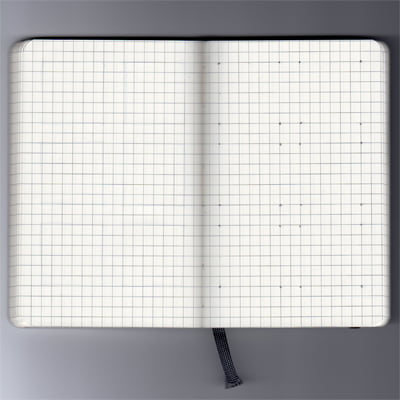
Lightly penciled dots create 6 boxes for the step-by-step illustrations
I do several pages at a time and then connect the dots to create the boxes. I even treat this like doing a Zentangle®, making all the lines in one direction first, then turning the notebook and doing the lines in the next direction, and so on. This process conveniently gives you 6 squares for your step-by-step instructions. Some tangles need an odd number of guidelines, so for those I do a page of 7-box squares. Here’s an example of the boxes ready to go:
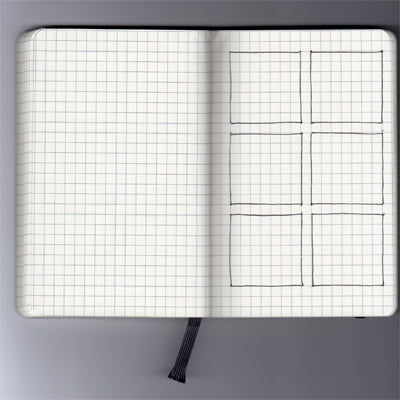
I’ve only use one side of each page because some tangles are quite dense with ink and there can be a little bleed-through through on the back of the page.
I leave the first couple of pages blank in the book and number the top right corner of each page. Then I can write in a Table of Contents on the blank front pages. This reference helps me find tangles quickly.
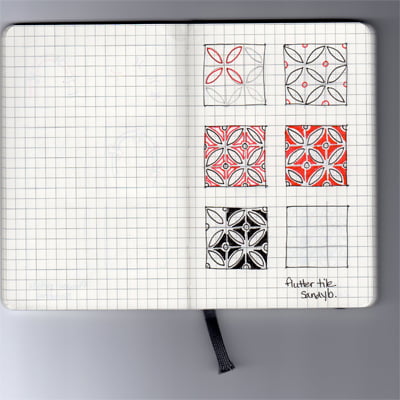
Then I draw the step-by-steps with red and black Sakura Micron pens. I often use my Zentangle pencil first to get an idea of how to place strokes correctly, then I throw all caution to the wind and let it rip with the pens. Here’s an example of Sandy Bartholomew’s tangle, Flutter Tile.
Recently I purchased the larger 5 x 8 1/4-inch size squared Moleskine®. In this one I’m creating a library of finished tangle samples and examples of variations so I can refer to it for inspiration. This size fits 15 tangles per page, so there should be lots of room for growth. Originally I used a small Moleskine® for this purpose, but it didn’t take long to fill it in. Here’s an example of what the small page looks like.
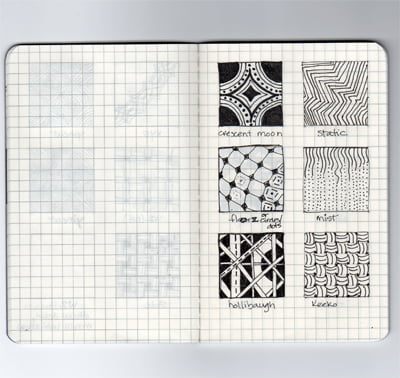
The first book of my tangle library, now replaced with the larger size Moleskine® with room for 15 tangles per page.
I invite you to share your system of organization for your tangles in the comments. Systems can always be improved and I’d love to hear what you guys have sorted out. Over to you …
BTW – Be sure to visit the DOWNLOADS tab at the top of the page for free downloadable templates to use for your tangles.
Get Your Supplies Here at Excellent Prices
If you’d like to try out my system, you can get these supplies on Amazon and they have great pricing compared to local retail outlets:
- This is the 3 1/2 x 5 1/2″ smaller Moleskine notebook that I use for the step-by-step drawings: Moleskine Classic Notebook, Pocket, Squared, Black, Hard Cover (3.5 x 5.5″)
- This is the 5 x 8 1/4″ large notebook I use for my “library” of patterns. I use the small notebook for the step-by-step drawings: Moleskine Classic Notebook, Large, Squared, Black, Hard Cover (5 x 8.25″)
- This is the red version of the 5 x 8 1/4″ large notebook I use for my “library” of patterns. I use the small Moleskine for the step-by-steps: Moleskine Squared Red Notebook Large, Red (5 x 8.25″)
- The BLACK Sakura Micron 01 pen for Zentangles: Sakura 50035 6-Piece Pigma Micron-01 Ink Pen Set, 0.25mm, Black

I also had to come back and say a big thanks to whoever first recommended Evernote – I had downloaded it a while ago, but just took the time to really try it out a couple days ago and LOVE LOVE LOVE it! (am also going to be using it for my recipes that I’ve found online – perfect!) I have now got both the windows version and the Firefox add-on on my desktop and laptop PCs, my Android-converted Nook, and my I-pod, and gotta say it is AWESOME!!
I love having the option to sort by alpha, date, tags, etc., and no matter which device I save an image on, it automatically syncs to all of the others! Yay!! And FREE to boot! (with a generous monthly limit) I am finding it might even be the thing I choose for an all-around planner/production/idea manager, to-do-list, etc., because I LOVE it so much, and can have different note-book stacks for different areas… If I do that, I might need to upgrade to the paid version, but perhaps not… I shall see. THANK YOU for this fabulous idea!
I am still putting them in my moleskin, because I enjoy drawing out the steps to favorite patterns so I can learn them better and practice, but Evernote is just perfect for keeping them all organized, I think!
BTW, one more idea for Evernote – I am using the same Tags (for artist names) that Linda has, where applicable, so I can easily cross-reference. 🙂
Thanks for this Jill, it’s very helpful. Quite some time ago I downloaded Evernote but haven’t had a chance to see what it can do. I’ll have to make time to explore it.
What a Bunch of terriffic ideas! I have been using gift tags-they r card stock and have a hole so i have them on 2 round key rings. I keep them alpabetically (by first letter of name)but can flip through them for inspiration I use both sides of the tag but make sure that both sides have tangles that start with the same letter of the alphabet so my “a” tangles are together etc.
Anyway linda thank u for the job u do with this site!
Carol
Jill, A BIG thank you, and whomever had this idea to begin with!! What an awesome tool!
Thank you, Linda for having such an awesome site so people like us can share and use each others ideas!!
I am so excited to begin using Evernote. I had Skitch all this time on my iPad, but never really took the time to use it. YAY! Now, I’ll have to choose, or use, both!
What a GREAT day! lol
Hi: For those of you interested in an app that is simpler with a nicer picture display than Evernote, you might check out SpringPad. I have the Spring Pad app on my computer and my iphone. (I think it’s available on Android phones too.) I have instant access to hundreds of patterns, drawing directions, strings, and ideas for inspiration. They are SO easily saved by clicking on a button which takes a shapshot of the picture on the computer screen. You can tag the patterns by type to put them in categories. I save all of my recipes, books to read, articles, etc. this way and love it. Check it out!
For anyone curious about using Evernote I just posted an almost short (15 mins) video showing some of the features and how I use it to organize my patterns. There’s also another video on Snagit – another program that I often use in conjunction with Evernote. Both programs are available for Mac and PC. I have no affiliation with either company other than as long time (Snagit) and very satisfied user!
The videos are on the Videos page on my blog here http://tinkeredart.blogspot.com/p/videos.html
After watching those videos, from Tinkered Art, on Snag It & Evernote I am going to get those apps. What a great tool Snag It is. I will be changing my organization for all things tangled. I can already see that this is going to make it even better. I like using 3 ring binders with page protectors for my patterns already, but now I can clean them up even better. I now have a new project, if only I had more hours in a day!
Thanks Linda for your wonderful site! I have been using this site for almost a year now. It keeps getting better. I hope others take note that donations are welcome, so help support this site & donate when you can. I have sent many others to your site & hope they have found it useful to.
Thanks to Tinkered Art for the creation & posting of those informative videos.
Hi,
I’m new to tangling and so happy to find this site because it’s a wealth of information! Of course once started I quickly realized the need for a way to organize the patterns as I practice or create new ones.
There are so many hints on here that are helpful to me and quick to implement, especially using Evernote which I already work with to quickly capture material on the go and the recommendation of two notebooks for library/steps since I already have a few gridded Moleskines of various sizes.
I started with the above method and it works great, thanks! I probably would have continued this process for who knows how long, but then I accidentally discovered the new Moleskine Evernote Smart notebooks!
They’re similar to their standard counterparts but supposedly have improved image capture so one can draw the scan right to Evernote. I think it’s worth a try and wanted to share. I’m interested to see if anyone has used them and what they think. I’m going to order one and see for myself, I’ll let you know how I make out 🙂
Moleskine Evernote Pocket Squared Smart Notebook (3.5 x 5.5) $24.95
Moleskine Evernote Large Squared Smart Notebook (5 x 8.25) $29.95
http://www.moleskineus.com/evernote-smart-notebooks.html
Thanks Heidi, I love Moleskines!
I watched the video and from what I can tell they don’t “scan right to Evernote” but are set up so you use your smartphone or tablet to take photos of the pages of your notebook and the images are added to your Evernote account. I notice it also says that “Each Evernote Smart Notebook comes with 3 months of Evernote Premium”, so presumably it requires an ongoing paid subscription of some sort?
We’ll be interested to hear from you again when you’ve given yours a trial run. Thanks for the input!
Hi, I’m interested too! The video did say “buy a new notebook every three months to keep you premium subscription” or words to that effect 🙂
Another great way to find interesting “tangles” is on Pinterest. I browse through there, find something I like and then come back here to find out how.
I just bought the small mole skins and followed your example. I love it. Although its work repeating the steps, it is well worth it to be this organized. thank you for sharing this great idea!
I have tried various ways of organizing my patterns, but this way works the best! I tried drawing each pattern on a sticky note and putting them in a notebook alphabetically. Which would have worked, if I had gotten a notebook that hadn’t fallen apart after 2 days! So now I am doing what I should have done in the first place and drawing them on graph paper in a notebook. Also, organizing them by style is much easier than alphabetically. I’m doing mine by grid pattern, border, filler, steampunk, etc. It works ALOT better when you are trying to find a certain style to fill in a space, because I always forget what a pattern is called! 🙂
Also, thanks to tanglepatterns for the awesome website!
I have a step-by-step blog post outlining my method for organizing (hundreds of) tangle patterns:
http://www.tanglebucket.blogspot.com/2012/08/for-my-fellow-tangle-junkies-some.html
Hope you find it helpful! It does not include step-outs; it’s more of a visual guide. I figure between the internet access on my phone and the printed guides I have from Rick and Maria (and the one I got by donating to this site), I can find the steps if I need them.
I love the grid idea. Moleskine products are fantastic, but limiting in their bound covers. I am going to try 8.5×11 graph paper sheets that are either 3-hole punched for notebooks or will slip into page protectors. One sheet per design; would allow for a lot of step-outs/tangelations on each page. Plus the grid has a nice, orderly way to it. 🙂
Sounds like a great idea, Jenny. The Moleskine books are just sooooooo expensive here in Australia.
I have been reading this ‘organizing’ section of TP.com and enjoying it. MANY good suggestions and systems!
I was given a Moleskin notebook (squared) 5″x8″ and a book about Zentangle from my good buddy (of more than 60 yrs)… So I began to put any how to info I found online about a tangle in it – using one ‘row’ for each tangle and adding it’s name and and it’s author. All of them were and are still entered as I find them or are emailed to me by TP/Linda (grin). I’m on my 2nd ‘big book’ using both sides of the pages (1,279 pattern steps to date). I also have purchased a smaller Moleskin book (3″x5″ squared) to put the finished patterns in, alphabetically, for reference. (that book is about 1/2 full and I use it a lot to look for a certain kind of pattern I want for an area)
When I get an email from TP for a new pattern, I save the link/website/steps to a .jpg file and in a folder of How To Draw on my computer – when I have a bunch of new ones, I print them out and then manually/draw them in my Moleskin notebooks (and send/give the printouts to my buddy for her to do the same or different as she chooses).
I also have a list of the tangle pattern names with the page # of the larger Moleskin notebook as to where to find the steps to draw each. I keep this list in the back of the larger notebook I’m currently entering them in.
So far this has worked well for me.
When participating in ZIA’s Alphabet ATC swap, I have chosen patterns beginning with the letter I am drawing and thus can find all the candidates under that alpha tab in my small Moleskin notebook – if I need a reminder of how to draw the pattern, I check my list for a page # and then dig out my larger backup notebook…
I do have questions for those using little handheld computer type things – once the pattern pictures or files are uploaded to the device, can they be sorted alphabetically? searched by name? or manuvered in other ways (by tags or by author)?? just curious cuz I’m not in our retirement ‘needing’ a small device but am very curious as to how much can be done on them. (grin)
Thanks again, Linda, for all you do to keep this website up and running so at least WE can get some tangling time in as a result – haha Perhaps we need to occasionally post that it’s a ‘Time Out for Linda’ so you also can get some tangling in? Keep up the good work, you’re doing a great job of helping the rest of us out!!!!!!
May the Good Lord Bless and Keep You (and Yours)
Nancy, your method is similar to what I use and I have found it to work out well. Using a computer is fine and dandy for storing your tangles but I think it’s a lot of work to go and turn the computer on and boot everything up each time. I prefer a good old fashioned paper storage method where i can turn pages and look whether i have a computer up and running or not.
All this talk of organising patterns makes my OCD self want to go nuts with colours and binders and and and…
or plan B, feel happy and content that I don’t have to start from scratch because the tanglepatterns guide you get as a gift for donating is so brilliant 😀 Very much looking forward to the 2013 version. Keep up the good work!
Nix
Thanks, Nix! 🙂
I’m one of those who likes to put hands and ink on paper. 🙂 I used to just fill a notebook with steps & a finished example, but got frustrated when I couldn’t find what I was looking for… I needed something expandable, organizable (I like alphabetical), and cheap. Just because. LOL My son gave me the idea to “do Zentangles like Pokemon cards” and that was that.
I use Linda’s 6-up grid template sized to fit 4×6 blank notecards and print them there on one side only. Then draw out what I like as new ones come out… and then, file them alphabetically in photo albums designed to hold 4×6 photos. I’ve got two 200-photo albums that are about 3/4’s full. I may have to move some patterns around to keep it alphabetized, but I have blank pages scattered throughout to make it easier.
Love flipping through it, and I love how easy it is for me to find patterns!
Oh, and I love this site and the templates, too… thanks, Linda!
I was a graduate student in the ’60s; that was pre-computers and even pre-calculators. There was a thing we used to organize our library research, or out results from our lab research. It was a kind of paper computer. It would be perfect for organizing the various tangles. It was composed of cards about 5 X 9 and had 3 rows of small holes around all the 4 sides. The center of the card was blank and could be used for either data or diagrams. There was a puncher that punched notches from the edge of the card to one of the holes in row 1, 2 or 3. You set up the coding system any way you wanted. Then you put the cards together in a stack. You had a kind of knitting needle thing that you ran through the holes, lifted up the stack and shook it. The cards with the code you wanted fell out of the stack. You could have one card coded for many different thing ( round, triangle, density, etc). When you were finished, you just slipped the card back onto the pile (order didn’t matter) until the next time. There was a large amount of room for diagrams or notes since you had the front and the back of the card to write on. I don’t know if they still make these. It is great because you are setting up a database of the information without having to know how to write a program or learn how to use a program. Just a thought.
Mildred, that just brought back nightmares from college. I could never get the hang of that system – had to change my major from Psychology because it required so much data processing! I’d love the chance to redeem myself with an updated method!
Lee: LOL The newer modern version of the data cards is called a computer with a database program! He He He. However, if someone does not have a computer, these cards might still be the way to go (if they are still made).
Actually someone suggested Evernote I have just downloaded it and will try it out. Sounds functional.
Mildred, if you put your tangle patterns on index cards, you could recreate this system by punching holes around the edges. Unless I’m mistaken, though, to make the desired cards fall out of the deck, each card needs to have all the holes punched EXCEPT the ones that match its data. Which would be a pain to do!
It would be simpler to use a color-code system with the colored dots we used to use on files. Fold the dot around the edge of the card. A card could have multiple dots for different attributes. Avery has packages of four colors, and other colors can be purchased separately. Half-inch coding dots come in a myriad of colors from instocklabels.com.
I found this interestinbg on the moleskin website Mokeskine Pocket Japanese Notebook its cool because the scrapbooker in me instantly saw an opportunity to do both tangles and scrapbooking, you can do your 3×3 design on tile then paste it to one of the folds and use the rest of the space for info like dates names etc. However it does have a draw back of only 60 spots for tangles .. But if your like me im a book worm and love the idea of a library of Tangles 🙂 Ill let you know how it turns out!!
I tried Evernote, but it wasn’t simple enough for me. Instead I use Springpad which is similar to Pinterest, but much more useful. So far I have about 175 Zentangle patterns saved on Springpad and lots of other ideas and work for inspiration. I can also access Springpad and all my Zentangle patterns on my iphone. ….. Good luck with your searches for the best organizing method!
I have come up with my own system with pieces and parts from a lot of posts (my thanks to everyone!). I use the squared half sheet card download and an 8.5 x 9.5 three ring binder (it’s a wilson jones and I also use their divider tabs). I have downloaded, converted, and re-sized the 2013 Tangle Guide to use as reference in the front of my book. The version with hot links is always available on my laptop. I only do one tangle per half sheet to allow for re-organization later. I can also use the back of the sheet for more doodles. 🙂
I like these ideas! I came across pre-made templates on cards for showing your steps. Each card was around 2.5″ x 3.5″, I think. Now I can’t find them. I looked online for like half an hour, and still have no idea where I saw them or even what they are called. Does anyone have any tips on how to find them or what they are called?
Sandy Bartholomew sells her pre-made Tangle Trading Cards on her etsy site or you might contact her via her website http://www.sandysteenbartholomew.com/index/
This might be it also, Sarah:
http://www.etsy.com/listing/28414685/tangle-trading-cards
Sarah, I think you might be thinking of Artist Trading Cards. I think United Art and Education and possibly Dick Blick’s sells them. I bought mine but then decided to make my own. I used 100# card stock and cut them to the 2.5 x 3.5 size. My son used to sell baseball cards and supplies so I had a case of baseball card sheets to use to organize. I do the steps on one side and the finished tangle on the other side. Then I put the completed cards in a notebook in the baseball card sheets. I keep mine in alphabetical order. I probably have at least 750. I’m sure it’s much easier to use Linda Farmers 2013 Tangle guide but I like to try the steps and I like to leaf through the book and I imagine I’m somewhat OCD!
Three people replied to me, but I only see one reply on here (I saw the others on my email). I wanted to say thank you so much! The cards you guys mentioned are exactly what I was looking for! I appreciate it! 🙂
I include a category defined by the name of the tangle-designer. I agree with LF that we can come to recognize an inventor’s style. So I can think “…I’m feelin’ like something a little s.s.ish. It’s like indexing a book … I can look up pies, or pumpkin or protein. Or head of state, war fought or offensive strategy attempted.
I also keep my page numbers constrained to a single letter of the alphabet. Even “Q.”. Then each new “P” pattern goes at the back of the P section. This means they are not alphabetized within each letter, but I’m gambling that my system will have evolved by the time I collect 500 P patterns. I mean, I awe-inspiring as Zentangle Nation is, I haven’t yet heard anybody suggest that we’re about to reach 13,000 tangles!
That’s my reference book. My eye candy/inspiration book is smaller with a single clean example of a tangle-pattern to a page. There is no order whatsoever, just what I drew before, what I’m drawing now, and what I’ll draw next. Yumm.
Ta-ta,
Mereth
I think these are the stencils/templates you are looking for:
http://www.etsy.com/listing/126827946/new-for-tanglers-step-out-stencils-2pc
Oh, and I also remember the knitting needle cards from the pre-computer days, and have often longed for them. There were so many ways to cross-organize the cards!meaning so many different spots one could punch out. I still can’t remember how to drive a computer, and looking up written instructions for anything I want is not nearly as fun as flipping through pen and ink tangle patterns. :~)
Me parece maravilloso todo he aprendido mucho gracias Cariñosamente camila
Linda,
Thanks so much for this template! I have Sandy Bartholomev’s atc cards, but I rather do this!
If you are like me, sometimes you just can’t figure out which tangle to use. I have printed out the tangle guide and just numbered the tangles. To chose a pattern when I just cannot figure out one to use – I go to my smart phone! I have downloaded a random number generator and use that to pick the pattern. No cheating! You have to use the one that the machine picks!
Lynne, I also have a random number generator that I use. I use it to pick the string. And, yes! No cheating!! When I’m done organizing the million tangles I have, I’ll figure out a generator for that, too. No…..I’m not addicted or anything… –Kelli Ross @ Divide and Tangle on Flickr
I took a leaf out of Sandy Hunter’s book (if you’ll pardon the expression!) – she uses pages with clear pockets for coin collections. I decided these were a bit small for my taste, and as I already had some clear ATC pocket pages, I decided to do each design on an ATC-sized piece of card – the front has the finished tangle, often in the form of a small artwork, and on the reverse are the instructions. This means all I have to do is flip over the page to follow the instructions. http://shoshiplatypus.blogspot.co.uk/2012/12/new-zentangle-album.html
I have bound them all in a large A4 ring binder, which conveniently has clear pockets on the outside of the cover, so I have designed a front and spine cover to slot in, covered with tangles. http://shoshiplatypus.blogspot.co.uk/2013/01/zentangle-album-cover.html
As for organising the patterns, I don’t find an alphabetical system is that helpful for me because I might not recognise a tangle by name. I am grouping mine loosely according to fills, borders and stand-alones, but these may get subdivided as time goes on.
The album is an ongoing project, proving great fun to do, and I love just leafing through it and looking at the patterns. Being loose-leaf it’s infinitely variable, and I am thinking of filing some larger tangles and Zentangle-Inspired Art work at the back of the book. It is already proving a useful resource.
Shoshi
what is ATC?
Artist Trading Cards – you can find more about them here on Wikipedia. Hope that helps!
I’ve been using the random number generator too. I love it-it removes all decision making and I focus on the tangle. I’m setting a challenge for myself-in a moleskin notebook (as Linda has described) i listed all the tangles on this web site-plus any i picked up elsewhere. ive drawn in the ones i know. i’m numbering ALL of them so if the random number belongs to a tangle i haven’t tried-i have to learn and use it. We will see how it goes.
Hi!
I’m brand new to Zentangle and I feel like this method of drawing was created especially for me. I’m guessing lots of you out there feel the same way. I say it’s especially for me because I’m a left-brained accountant and have always wanted to be more artistic but was intimated by trying. What I want to share with you – and keep in mind us accountants can be some of the most organized people in the world – are some products I’ve found that, for me, are simply the perfect way to organize my designs. First I discovered a specialty notebook called Circa on the Levenger site (http://www.levenger.com/Circa-Notebooks-326/Circa-Notebooks-339.aspx). A person has flexibility in the size wanted, there are numerous styles of pages that can be purchased depending on how you like to design or organize and the pages can be inserted and removed easily when wanted. This system is a bit on the expensive side but I have found that I just love it. The pages I like to use most are Dot Grid and Storyboard sheets. They are just perfect for drawing designs (the sheets are thick enough that you do not get bleed through) and annotating along the side variations, what to focus on and any ideas you have. With the large variety of pages available one could even keep a journal of thoughts and meditations right along with your designs. I just love the flexibility of not only Zentangle but how this Circa notebook can be used to contain a person’s collection of designs. So far I have arranged my designs in the notebook according to “style.” I have boarders, free-form, grids, lines and stand-alones. And regardless of what “style” they are organized under I know I have the freedom to use the style in any direction my heart or mind wants!
The next item I want to share is something I just found today on Etsy. It is a bandolier that goes around your notebook, or even your note box if that is how you organize, and holds all your special Zentangle pens and pencil. Well, it won’t hold everything if you are into color but for the original black & white with shading it is a perfect and attractive way of keeping your tools with your notebook. The site address is: http://www.etsy.com/listing/64819342/journal-bandolier-pencil-case?ref=col_view. Don’t use that period after _view in the address; it’s just a period. So, that is what I wanted to share with you all today. I wouldn’t have commented but I’m just so excited about these tools that I wanted to share with all you Zentanglers out there. I hope you find it useful.
Thanks for reading, Audrey
I am in the process of organizing my tangles. My dad got me a 200 page Booklet of Graph Paper. I am currently putting a tangle a page with steps, much like above in the article. Then I’m going to put them in a Tangle Binder and alphabetize them with a Table of Contents. I love organization so much! I also love that idea for the iPod Touch. I normally look up patterns on my iPad, so that fits!
I like the I pod idea. I have taken pics of the pattern steps, with my ipod touch to use for reference. I also like the small book idea. I have a 6 x 6 wire bound drawing book that I store all my designs in. I found some heat binding laminate sheets that are 2.5 x 3.25, I am making a pattern ring to keep all the pattern examples on. It’s a little bulky but its fun to flip through the ring and pick one. I figured it was a great way to re-purpose a cheap flea market find. The best part is the patterns are protected.
I am new at this whole Tangle “therapy” but I am loving it! I enjoy it so much that I purchased a pack of 2.5″x3″ cards and I have them on my desk at work. When there is a slow moment, I pull one out and begin to practice a Tangle that I had seen or whatever happens to come to mind at that moment! 🙂 I dated and saved all but I am kind of embarassed because my Tangles do not look as good as those on this site! 🙁 But I will keep practicing. I have some of those cards and my Micron & Sharpey pens in a glasses case in my purse for those long waits! I love this site and look forward to many hours of enjoyment here! 🙂
Hi Lynette, I’m delighted you’re enjoying the site and you will certainly see your progress as you keep at it. Dating your cards is perfect to record and see your “hand” improve as your fine motor skills become honed as they’re used more frequently. If you look back at the first tangles I published (use the ARCHIVES tab in the left sidebar) you’ll see my improvement over the last 3 and a half years too. Maria Thomas has almost 50 years experience on us all, so we have no need to be embarrassed but lots to aim for! Appreciate your accomplishments as they come. Happy tangling!
Linda – Thanks for the inspiration! I am relatively new to tangles. A customer came in to Michaels where I work and purchased 10+ canvases and I asked her what she was going to do with all those. She told me she was going to tangle and told me to Google this term. And here I am…..going completely nuts with patterns and learning. Until I learn and become better at the design process, I purchased an inexpensive graph steno book that I can carry with me at all times. Its a great way to design and contemplate. I then transfer the process to other media and voila, ready to sell my handiwork. Thank you all for the inspirations.
Melinda: I just bought the tiny little canvases (4 of them)at Michaels myself. I am so new at this that I am practicing, too, in hopes to transfer to those little things! 🙂
I like your idea of the steno book, but I would find myself trying to by the graph. I work in an Architectural firm (Office Manager!!!) and I have had a hard time coming up with the outline of a design – no problem filling it in just setting it up. So I started suing the outlines of the properties of some of our customers! 🙂 I know it sounds DUMB! But, hey it is working for me. I love this site and seeing all the neat ideas here! Thanks everyone! and Linda…thank you for the encouragement. Much needed! 🙂
Hi, I’m new to this too but it is so peaceful & calming to do. I’m waiting for my TOTALLY TANGLED book hoping it arrives today but wanted to say thank you for all the tangle & string patterns.
I really like the idea of having the cashier’s type paper to practice on, thank you big time for this idea.
I’ve been a stamper/card maker for years so this is different, I’m getting addicted.
I am new at this, but I find evernote is good for reference. As I have used it for other things before this. And it lends well to keeping tract of things. I also use a graph paper notebook, and a plain page note book.
And I am learning or should I say teaching myself digital graphics so am doing this as well. But the digital takes more getting use to, as you don’t have the feel of the ink beneath your fingers, or the texture of paper to run the ink across.
Also as I always to I bookmark all blogs I run across, and keep a blog roll going to see what is new on each blog.
And Zentangle® is not digital. The whole philosophy behind it is to be “unplugged”. Something you can do anywhere, without technology 😉
Mijn archief voor de tanglepattern is mijn iPad. Vind ik een mooi patroon met of zonder how to draw op de site, dan sla ik het op in een album. Hierin kan ik sorteren op vorm.
Ook eigen ontwerpen en eigen werk archiveer ik op deze manier. Heel overzichtelijk en snel te vinden. Het origineel bewaar ik in een ringband met losse insteekhoesen.
Linda’s edit >> Mr. Google translates – “My shelf for tanglepattern is my iPad. I find a nice pattern with or without how to draw on the site, I save it in an album. Here I can sort by shape.
Also own designs and creations I archive this way. Very clear and easy to find. The original I keep in a binder with loose insteekhoesen.”
Evidently he had problems with the last word.
I am new at making Tangles and your idea is a great one. Thank you for sharing.
I started tangling about 2 months ago and it has taken over my life! I had a motorcycle accident in 1996 which left me disabled. I use a wheelchair and I wear a brace on my right wrist due to chronic arthritis caused by a bad break in the accident. I used to do a lot of calligraphy, gold leaf and watercolour painting prior to the accident and haven’t been able to do it since. I found out about Zentangle a couple of months ago at a local craft club in Leeds, UK when a member of the group was trying to think of a craft that she might enjoy doing. She said she didn’t like knitting, crochet, sewing or any of the usual crafts that most of the other members did. One of the ladies asked her if she had tried Zentangle. I had never even heard about it but when I got home later that evening I googled it and found your website. It has changed my life literally. People might think that sounds a bit dramatic but it is the truth. I had a go the following day and within a week I had spent quite a lot of money on various equipment, pens, paper etc.stuff I didn’t really need but glad I got it. I downloaded all the tangle patterns, printed them out insmall squares, cut them up into small squares, and put them in a Roladex in alphabetical order. This is a fantastic system as it means that I can use any of the patterns randomly by spinning the Roladex and wherever it stops I use the pattern showing. It also means that if I want a particular pattern I can find it easily. I also printed out all the strings and printed them out onto card, laminated them, cut them into individual small cards and keep them in a tin so that when I want one I can choose one at random. I have found that my wrist is getting stronger by the day, it is getting more mobility in it and the pain is less than before. I suffer with depression and am on 43 tablets a day for this and pain including morphine and have found that I am so much happier these days as I have something that I can do which keeps my mind active, my body relaxed and I have done something productive. My daughter has noticed a difference in me as have my twin 9 year old grandsons who, incidentally, enjoy tangling as well. When they come round we sit round the table for hours making ZIA. The boys love the Roladex system, they spin it and get a pattern, do that pattern the we swap tiles and we do a different one so that we end up with a wonderful piece of art that we have all had a hand in making. I no longer feel as depressed, my pain is improving day by day and I feel I have something to offer, which may sound strange but if you have been in a position like myself you will understand what I mean. I would like to say a huge thank you for such an amazing website that is all free and hope that people support you as I have by buying your online books or by making a donation so that people like me have a wonderful website to go to for many years to come.
I clicked on the reply to Amanda’s comment and came to this site. Wow. So many ideas. Firstly responding to Amanda – great to hear your story – so inspiring. I am at the moment dealing with an unknown infection in my mouth which causes a lot of pain. I find that when I am engaged in tangling – either learning a new one or creating a tile I find my mind over-rides the pain. I have only been tangling for about 18 months and really appreciate all that Linda offers. In the beginning I was downloading tangles I liked, printing them and putting them in ring binders to then copy. After a couple of binders which are big and bulky I decided to take down the steps by hand and then re-do them better in an A6 spiral good quality paper notebook about half inch thick. That was OK for a while until I was going to visit my family in America ( I live in Australia) . I needed to downsize again and I was finding the notebooks a bit difficult with the spiral. So … I cut up 100gsm A4 good quality photocopy paper into 3 inch strips and then fold in half. I work onto the mini pages both sides and put then slip four pages together. On the first two pages of one set I make an index with the name and a mini drawing of the finished pattern next to the number of the page. When I have 3 lots of four I stitch them onto a thicker piece of card with the very simplest book-binding stitch and cover my knots with a nice piece of hand made paper which lies flat. This way I was able to take my little book, a set of tiles and a few pens in a pencils case in my hand luggage and tangle all those miles across the world and then for hours while snowed in in Iowa City for 6 weeks. Now I am home again I am making another book with the tangles as they arrive on Linda’s site. The down side is they are not alphabetical but it doesn’t take long to skip through those couple of pages and find something. This size also fits into the smallest handbag along with my little pad of good quality paper that I use when I am waiting for an appointment. Time goes so fast. I have printed off Linda’s PDF she sent when I subscribed and like the idea of laminating and cutting up and picking at random – might try that one. Luggage tags sound good too. So many ideas! Thanks Linda for a wonderful sharing venue.
I am using the Moleskin App on my iPad to organize a catalog of Tangles! I have a Moleskine for each letter of the alphabet all on. My iPad! It’s very easy to use!
I have my Zentangle patterns organized in boards stored alphabetically in Pinterest. I print out patterns individually that I want to create a piece. I see now the benefit of creating a notebook of some type. I probably will go with a binder. I’ve downloaded your template pages and greatly appreciate you sharing them. Hope to get better organized soon.
Some great ideas here. I have a file box and I place my designs in the box. Then when I don’t have an idea I take one from the file.
I like the idea of using either putting pattern on pincrest, cut and paste unto my word program,o do a spreed sheet.
Thanks for the suggestions.
For me, tangling is time away from the computer. So I create my own Tangle Cards: I set up a Word document with a table to make four “cards” on a page. As I find new patterns on the Internet I want to try, I either drag and drop them or take a screen shot to copy them. I resize the images to fit my cards. When a page gets full (four designs), I print it on card stock and cut the cards apart with my paper cutter.
Because the cards are loose, I can pick out the ones I want to use and see them all at the same time. Sometimes I play a game where I shuffle the cards and deal out four of them face down. I draw my string before I turn the cards up. Then I have to use 3 of the 4 to draw a Zentangle.
I am new to tangling and started collecting patterns and storing them on a memory stick. It works great for storing them alphabetically, but I am unable to see them without opening up each item. I am still undecided how I want to organize them. There are some good ideas here to consider.
I am a notebook person, and I love squared notebooks. I am new to zentangle and overwhelmed by the number of different patterns. I would like to organize them by type, but I plan to experiment with the different ideas here. Thank you for posting this topic!!! I was so frustrated. Now I have a way to proceed.
I want to add that I am dealing with my 97 year old mother’s decline, and doing these zentangles has really helped.
Great idea! I’m all about organizing!
I have been trying to come up with a way to store/organize my tangles for months. I have several books, I actually don’t have any on my computer but I do have a lot on my phone. I have done index cards, but decided I did not like that. Right now I am currently using a sketch book with 1.5×1.5 squares and drawing the finished tangle in there and then naming it with the book number and page (it is from the Design Originals, I have all 11 books) so I will do 3.5 if it is book 3 tangle 5 in the book. That way if I do need the step out I will just pull out the book. Any that I find on the computer that I like, I do the step outs for or practice the finish one enough until I know how to do it. But trying to get a definite organized system seems to always be in the work
s.
I can see how I could use EVERNOTE to organize my tangle patterns. That way I could have them both on my phone and my computer and just sync when I add more to one place or the other. Thanks to all for the motivation!
I just downloaded Evernote and am giving it a try – thanks.
I recently found an old Rolodex at the thrift store and I am using it to organize tangle patterns. Most of the cards were empty and it’s very easy to create more out of card stock using one card as a template. I also like it because I can store the patterns alphabetically and pull out the ones that I want to use whenever I like. This might be a good solution for some people if you have a rolodex in the attic/basement or if you can find one at a thrift store or flea market.
Thanks for all you are doing to share your love of Zentangles with the rest of us. I really like your organization tips (notebook, detailed steps, and library of tangles.) I love order, once I can capture it.
Evernote, what a Godsend! Thanks for suggesting it, I can see using it for so many other things too.
Since I’m new to Zentangle and my husband clueless about it, when I asked him if he wanted to “Tangle with me” he thought that I’d gone nuts and was picking a fight, when I said that wasn’t what I wanted from him his manly man kicked in and thought that I wanted the opposite of a fight! He was disappointed when I told him what I was talking about but then he started doing them with me! A great trick to get your husbands to ‘Tangle’ with you ladies!
I was very interested n your system for organizing patterns. Which are the two moleskin books you use…there are so many. I would like to try out the two u showed to use do completed patterns and the other includes the step outs. Links on Amazon would be great. Yanks so much
You’ll find the Amazon links under the heading “Get Your Supplies Here at Excellent Prices”.
I use an artists’ sketch book.
I divide each page with a line down the center. On each side of the line, I use the lid of a small tea tin that measures about 3.5cm x 3.5cm to draw boxes to practice drawing each new tangle. Using the lid I’m able to draw four boxes on each side of the line.
I work somewhat like you do. I draw one step of the tangle in each box. As you said, sometimes a tangle takes an odd number of boxes to complete it, so I may use 5, 6 or 7 boxes to draw all the steps in a tangle.
When I finish drawing the tangle I number the column on the page in which I started it.
I only wish I had thought of your idea to leave a few blank pages at the front of my book for quick reference. I’ll do that in my next book for sure 🙂
I have been tangling for almost a year and have a sketchbook full of tangles. When I first tried to organixpze them I took several pages in my sketchbook and made tiny tangles (about 25 to a page. Then several months later I had to do that again. I found it difficult to find the one I was looking for so I tried a binder with pocket sleeves like the ones for baseball cards…only these are 2 inch squares. I think they are probably used by coin collectors. I cut 2 inch squares out of card stock. I make a tiny tangle with name on the front and notes on back. I put the date I learned it on the back. That date corresponds to my sketchbook which is dated chronologicallyHere. I can go back to get step outs and additional notes from my sketchbook if needed. I organized them alphabetically leaving space to add tangles and additional pages.
I like the idea Carol sent in about organizing them by type. That will be fairly easy to rearrange mine. It will certainly be easier to find what I am looking for that way. Thanks everyone, for the great ideas.
I notice that I had so many tutorials that I purchased baseball card holder! I can put two 2×3 in each pocket…one on each side. I then place them into categories…Grid…Floats…Line…Ribbons…etc. As I learn each tangle I place them in the back section of my binder! The system works wonders for me!!
I just checked out the notebooks you use here in Australia in our Officeworks store, and the prices are horrendous. I’m definitely going to have to find a cheaper alternative somewhere while I’m learning at least.
I use a Rolodex for my Tangle patterns and it is the best! On the front of the card, I put the name, who created the pattern and draw an example, and on the back of the card – when you flip it down, are the steps to create the pattern! I even have them on the Rolodex by type: such as, borders, leafy, fill patterns, etc. And, of course, being an organization freak….. They are in alphabetical order. The best part about that is when I find a new pattern online, I can easily check to see if it is already in my Rolodex without having to search through hundreds of patterns! The Rolodex is the larger kind with the larger cards that can hold a business card. I used a small square punch on a piece of a file folder to make a stencil for making squares on the back side for putting in the steps. Some tangles are free style and some require a square….so it is nice to have a quick square to trace. Hope you all find this an easy way to sort and store your patterns! My Mom loved it and did it too! We tangle together!
What absolutely FABULOU ideas!
I like the unlined 4 x 6 card and notebook concepts. Here’s something that may save people from printing the step out squares on cards or drawing them in notebooks.
Make a template from what I call “poly plastic” – the thin flexible colorful stuff that is used for binders and folders. It’s less than 1/8 inch thick (1.5 mil? 2 mil? thin) and a poly plastic binder costs less than `1.00 USD if you don’t have a bunch of them lying around your house. Or search the office trash for poly plastic binders with broken rings 😉
Cut a piece 4 x 6 inches (I use utility cutter and cutting mat). Mark 6 small squares on this with a sharpie. Cut the squares out (I use Exacto #11 to make an X in the center of the square and then actually cut out the square with sharp scissors, safer!). Now you have something you can use on a card, notebook page, or whatever – plop it down, trace inside the cut out squares and voila, step-out setup!
I’ve made these for step outs, standard tiles, bijoux and zendalas. THey can be “positive” (cut the actual shape and trace round, outside it) or “Negative” (cut the shape out of a larger piece of poly plastic and trace round, INSIDE).
Happy tangling, everyone!
My system is similar to Lori’s (above), but I created a template for the front and back of cards that are the same size as those collected by sports fans. One side of the card is for the pattern step-out and designer. The other side if for creating a sample design using the pattern. I use the protective covers, and various sized flip top boxes, both sold at the card shops, in which to store the cards. I keep the patterns in alphabetical order for easy reference. I like being able to pull various patterns to see how well they work together side by side, and then being able to easily return them to their place in the box. I also keep a copy of Linda’s Tangle Pattern Guide on my computer for reference, but I like creating my own copies of the step-outs for practice. Sometimes I think I like organizing everything, as much as I like drawing the tangles. 🙂
Love your system, and am just starting out, so your site is a great help to me.
I’ve just started tangling and this thread gave me the idea to try and organise my tangle library. The idea I had was to take photos of each stage in drawing a tangle, then putting them together in a photo collage app on my iPad. I can then print the collages off later if I want to.
Cheers
P.S. Please feel free to delete this comment if someone has already shared this idea.
Hi Suse,
What is the name of the ipad app that you use on your ipad?
Is it called Photo Collage Creator? Did you purchase any in-app freatures for it?
I might try this as well.
I have been tangling for a couple of years now but have only recently decided to really do it properly, ie actually learn the patterns and file them in some way. Having read around the subject I decided on Sandy Hunter’s method of using coin collecting wallets in a ring binder (http://tanglebucket.blogspot.co.uk/2012/08/for-my-fellow-tangle-junkies-some.html). This system allows you to draw a mini 2×2″ version of each tangle and store it alphabetically. This is great as a quick reference guide.
However, not knowing the patterns really well left me with a dilemma – I would see a pattern I wanted to use but couldn’t for the life of me remember how to do it! So I now have an additional binder. I cut and paste the step out for a pattern into Word and print onto file paper. I then search online for examples of how people have used the pattern, cut and paste the ones that inspire me the most and add them to my page. I limit myself to one double-sided A4 sheet (I’m English!!) per tangle. This seems to work for me.
As I use the tangles more often and they become second nature, the second file will not be needed as much but I can see that I will then need to work on finding a solution to categorising the different types of tangle! Eventually I hope to have an ipad and store them on there too.
I have had the same problem as everyone else has had in how to organize my tangles as their number keeps increasing. I also started out with a book and a table of contents, but it was too inconvenient.
Then as a retired nurse researcher, I thought why not put them on 5×7 inch index cards. And so I did. I store all my tangle stepouts in my computer (which are also automatically saved on the cloud)and print them in 5X7 inch size and double stick taped them to the cards. Then I found that they were convenient, readily sorted and easily read and followed, but not very portable.
So I took the idea of Sandy Steen Bartholomew and her small 3X4 inch box of trading cards containing tangles on one side and their stepouts on the back side. I cut my 5X7inch cards into 4 equal pieces, printed the tangle steputs in wallet size (=2.5X3.5inch size) on the computer, double stick taped them to the small cards and placed these into 5X3.5X1.75 inch boxes found at local store in the section with children’s school supplies. Now I could alphabetically and topically sort these and group them together with tiny rubberbands found in the beauty hair section of the same store and keep them in these small “trading card” size boxes.
I store my black and white tiles separately in two small metal boxes that originally contained YouTangle tiles when purchased. A group of black ink pens, and a group of white ink pens, plus pencils, sharpeners, tortillons, red ink pen for recording stepouts, etc. are stored in a pencil case. All of this fits into a 9X7.5X3 inch bag that I can carry with me.
Anyway, it all works like a charm and can be changed at any time.
Levenger also sells 3×5 cards, with graph paper lines, dots, or plain that are perfect for zentangle step outs. Very good quality cardstock.
Reading all these suggestions, I began to look through some of the office supplies I have hoarded over the last 6 months (I buy when on sale even if I don’t need it). I came across some plastic ‘Ultra Pro 9-pocket pages”, a graph paper composition book, Avery durable write-on plastic dividers with pockets, and some Avery business cards. it got me to thinking about how you could print the finished tangle in the middle of the business card and slide it into the pockets on the plastic sheets. The composition book could be used for the step by step instructions with page numbers and then you could put that page number and even the book number if you have more than one on the business card. The plastic dividers have tabs and are also colored…
just a thought… think I’m going to try it that way!
Thanks Laura, hope you get time to fit your Zentangle practice into this endeavor! 😉
Dear Tangle-Fans,
although until now everybody probably found a system to organize the patterns, i finally found a system which works great for me, so i want to share it with you.
When i became tangle-addictet, i tried to draw a lot of patterns in a note book…in alphabetical order…and without the steptouts.There were two problems: when i saw the picture, often i could not remember the steps how to draw it and there were always coming new patterns on the site,so my alphabetical order was a mess…Then i tried to draw the patterns with step-outs in a notebook…but that took too much time and it frustrated me.I was not sure how to organize…by name, by year or by type…Finally i found a system which works perfekt for me, maybe it`s interesting for some of you guys,too. I save the patterns i like on my PC and i save them by year.Then i upload them into an online-fotoshop and after the fotos are developed,i go and pick them up in our local shop (like you develop fotos from your last holiday trip :)).Usually i wait until they offer special prices and then i order a lot 🙂 The fotos i store in a fotobox with a register,2010-2017.The Benefit is,that you can just add new tangles and don`t mess up the older ones,because there`s no need for alphabetical order.If i have the time to tangle, i can just grab one foto out of my box and start tangling-so i accidently get to now always new patterns.
Have fun,
Marion
I take pictures on my iphone of the step-outs and finished tangle. Then I move them to my tangle album (I set up on my phone) and they are easy to find and enlarge even on the go.
Of course I have back-ups for back-ups because I am from the old school. Good luck everyone. So many great ideas! Thank you!
The phone idea is great! I need to do that instead of sitting for an hour every night hunting down to build my book of Tangles.
I’m new to this art form and can’t draw a lick – well, maybe just a little. Thanks for the organization tips. What a great idea.
Wow there are so many comments/ideas for organizing. I started reading them, but didn’t read them all, so I hope this is a new one…
I use powerpoint to organize my stepouts, that I can make into a pdf and carry on my phone or any device with or without internet.
I can manage to fit 1-2 tangles per slide with stepout,example, and sometimes notes. They are sorted by category and have links within the powerpoint (table of contents for each category) and to the web.
This was SOOOOO much help!!
I use a round paper punch that produces 1-1/4 inch circles. I make zentangles on the circles and double tape them into a 3-1/2 x 5.5 notebook from Arteza with 118lb paper. Six to a page and no order. I enjoy the process and looking at each one and embellish around the samples too. If I can’t remember how to do one… I bought Linda’s 2021 PDF (fabulous work).
Great idea to embellish the page too, and many thanks for the promo 🙂
Hi everyone,
I started with Linda’s original idea in the moleskin notebooks with a twist. I bought a two inch by two inch stamp and an ink pad. I stamp six boxes on each page in the notebook and there you have it…boxes for a step out. I found the stamp on amazon. Sometimes they are called lable frames, other times they are called borders. They come in a variety of sizes and shapes. Drawing the squares just took me way too long. Using the boxes still gives me plenty of room on each page to write notes. Although I do wish that I had done it only on the right hand side so that the bleed through would not be an issue.
Hello!
I visit this site almost every week, since 2018 (?), well, I tried: old schedules, books, notebooks, cards, and still try every way to draw all patterns… I think is impossible… so.. let´s Tangle forever
I, too, like you Roseli, try and keep up with drawing out all the patterns shared that I like – on 4″ x 6″ cards, front and back and sometimes another card too – 1st side are the steps, name of tangle, who authored it, then the other sides are notes and drawings of the tangle, sometimes mixed with other pics, too. I file these in 4″ x 6″ drawers and now have 3 double drawers plumb full of patterns! eek! lol looking for more drawers, preferable black and double…
On with our tangling… (grin) Nancy Barnhart 79 yrs old
Hi friends –
I thought I would share my way of organizing tangles that I haven’t seen elsewhere. First, I should tell you that I am trained as a reference librarian so that “flavors” my method of organizing things.
I use an MS Word document I call “Vol Z” as if it is the last volume of an old-fashioned encyclopedia. I toyed with moving to other retrieval methods but decided to stick with this method.
Using a Word document gives me powerful search capabilities and the capability to embed photos of my work samples done on Bijou tiles. I’ve been using this e-method since 2014 when I became a CZT and it has expanded right along with my interest in The Zentangle Method. (Note: I never print what has grown to be a rather large document. Besides, I would lose the keyword search. And I always back-up to The Cloud.)
Within Vol Z, I’ve built a structured list of keywords to point to “primary sources” for step-outs, artists and related materials. My keywords point to the names of tangles with step-outs, selected project packs, lesson plans, reference books, my finished tiles and anything else I want to find later by keyword. Sample keywords include Alphabet tangles, various Holidays, Travel tangles, Sakura products, Supply sources, etc. The keyword list grows as my interests change.
I don’t duplicate my sources if I can help it. For example, if a step-out is available in Tangle Patterns*, I only cite the name and artist of the tangle in Vol Z as a place to keep my personal notes. (*FYI – It’s so worthwhile to keep up an annual subscription to Linda’s resource!)
I hope someone will find this useful. Sorry it was so long.